Showing posts with label OPatch. Show all posts

Monday, April 7, 2014

EPM 11.1.2.3.500 Patching Woes, Trials, and Tribulations

A warning
Don't take infrastructure advice from me.  Ever.  That begs the question, “Why are you reading a blog post on infrastructure by yr. obdnt. srvnt.”?  Simply because tales of suffering, woe, and misadventure are always instructive and sometimes entertaining.  Read the below to know that when I write this I state the truth. 

The following workaround fixed my issue, but I make no warranty that it will apply to anything other than my environment.  With that huge caveat, off we go...
Why I am here
As most of you know, I am a serially challenged (I do it again and again and I fail again and again) infrastructure idiot.  However, needs must when the devil drives, and no one else is going to install the 11.1.2.3.500 patch for me, so....

I spent most of the last weekend in March struggling with that EPM 11.1.2.3.500 17529887 patch.  Much of the issue was that Planning simply didn't work.  My compact deployment started up all right, but when I tried to enter a Planning app, nothing.  And by nothing I mean I could not edit dimensions, forms, etc., etc., etc.  Bummer.

Help is on the way
In desperation, I reached out to John Booth (if a customer needs infrastructure work, I am not sure why he would use anyone else – for sure you shouldn't hire me) and described my system symptoms.  John asked if the ADF patches 16964825 and 18362693 had been applied. 

I think they are supposed to be applied automatically as part of that big (2 gigabyte) patchset but it didn't (apparently) happen. 

I tried applying those patches from the normal C:\Oracle\Middleware\EPMSystem11R1\OPatch location.  They failed.  I reached out to John again (not many would take calls on a Sunday -- thanks, John) and he explained to me that there are two opatch locations.  The ADF patches, because they are at a base level of Fusion (I think I have this right), are applied at C:\Oracle\Middleware\oracle_common\OPatch.  I applied the patches and now Planning mostly worked.

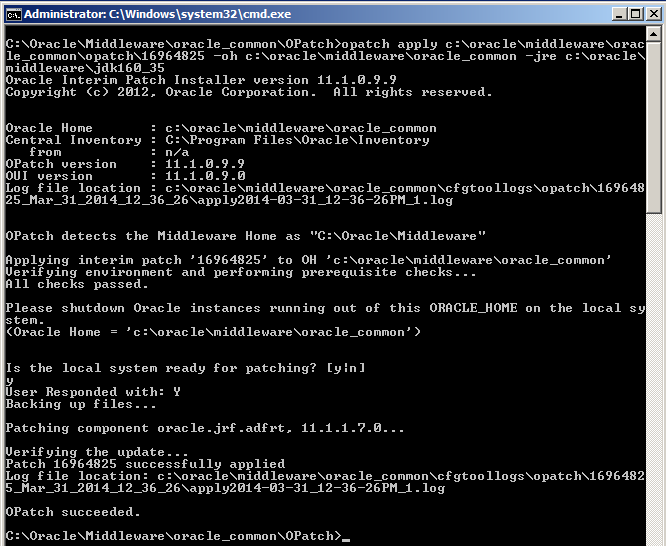
Here are the screenshots (the second one is important because there is a twist) of the patches being applied.

16964825

18362693
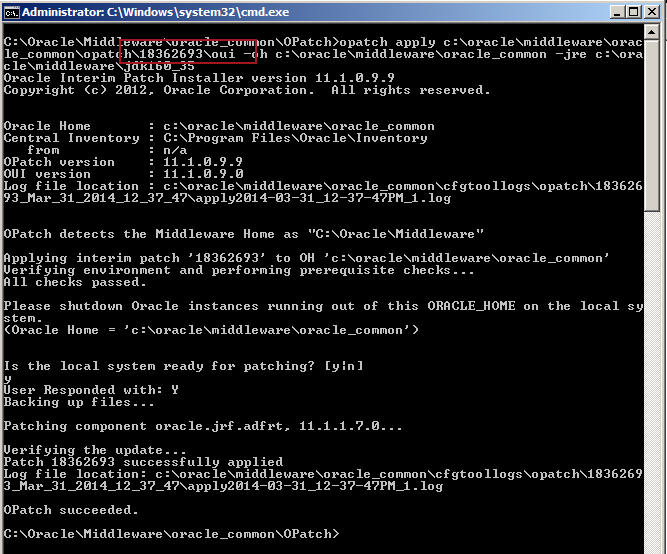

Did you see the special bit of the patch here?  Don't just patch 18362693, patch 18362693\oui.  From John I know that "oui" in this context is not "Yes" in French, but instead Oracle Universal Installer.

Did it work?  Yes and no.

The issue

I could now get into Planning via IE.  Terrific.  But Planning via Smart View...it was interesting.  What's wrong with the below screenshot?
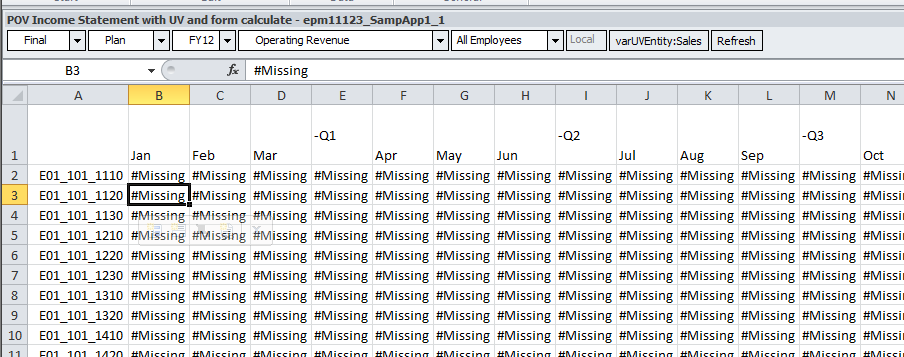
Take a look at it in IE:
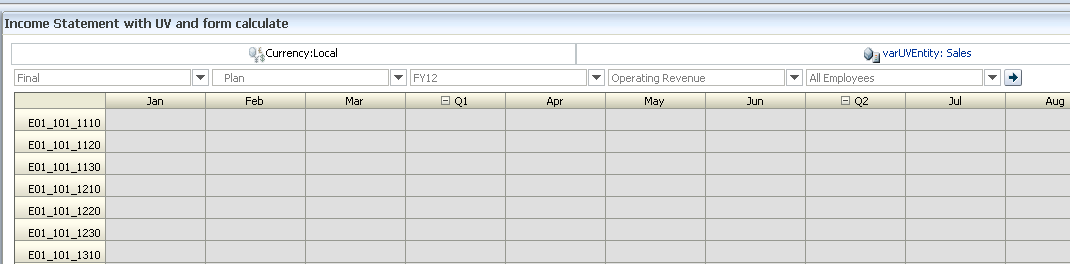
Yet Another Infrastructure Moment of Pain or YAIMP.

The fix

What I did was roll everything back (thank you VMWare and thank you Cameron for being the cautious geek you usually are) via VMWare’s snapshot functionality to a prepatch environment.

I then applied those two ADF patches before I did anything else in that C:\Oracle\Middleware\oracle_common\OPatch location.

I then applied the rest of the .500 patches in the normal C:\Oracle\Middleware\EPMSystem11R1\OPatch location.  Opatch tried to apply the two ADF patches (it is built into the 17529887 patch as far as I can tell) and aborted their reapplication, but continued on with the rest of the patching process.

I then crossed my fingers.  Did it work? 

Why yes it did. Whew.
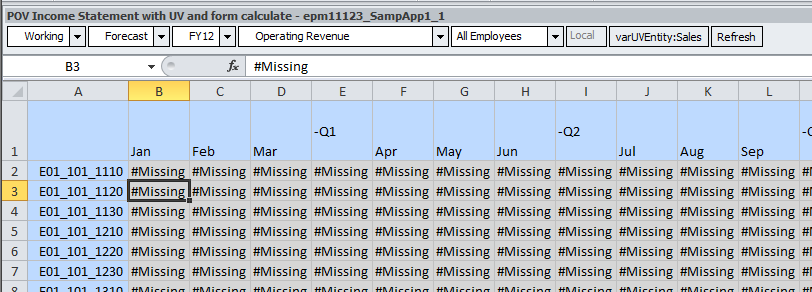
The clew I should have knew

Were I more eagle eyed, I would have seen this in my initial failed install:
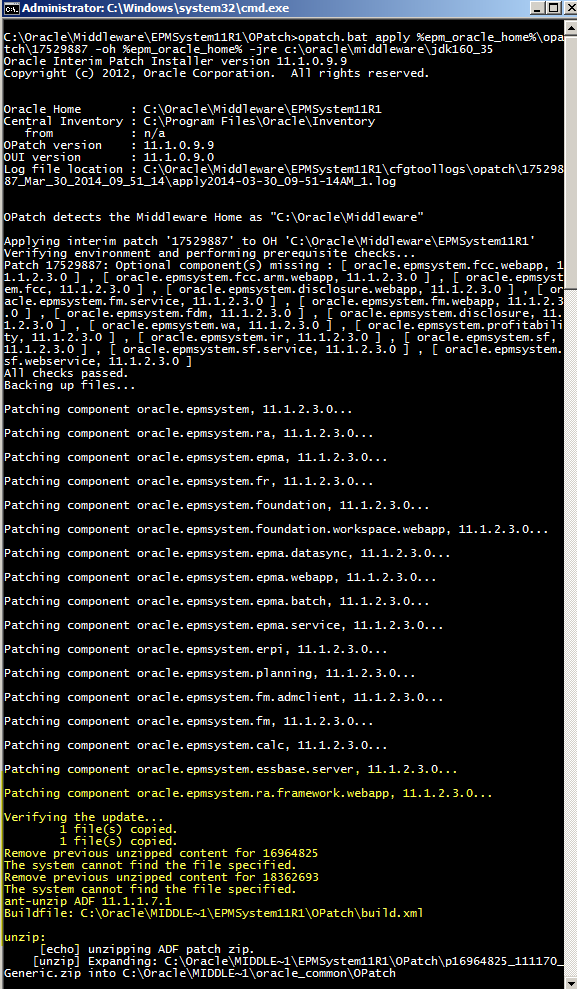
That would be the two required ADF patches going KABOOM.  Did I see it?  Nope.  Dumb, dumb, dumb on my part.  As my teachers used to say back in school, “A smart boy, but does not pay attention to detail.  Must do better.”   It is nice (?) that my fundamental personality traits are constant through time.

Even dumber is that this is explicitly noted in Oracle Support KB article Issues Using Planning after Applying EPM Patch 11.1.2.3.500 (Doc ID 1640411.1).  Although I swear that when I looked for some clew (or clue) to my issue I couldn’t find it.  Sigh.

The cause

So why didn’t it work?  Most likely because I didn’t have my 11.1.2.3.000 environment set up quite right.  Careful reading (oh sure, now I do this) of the Great and Good John Goodwin’s post on 11.1.2.3.500, rewards the faithful reader with this important note:
One thing is nice is that applying the patch looks to automatically install the required ADF patches in to oracle_common home. (if you have opatch added to the path variable that is).

Looking at my PATH environment variable I see:
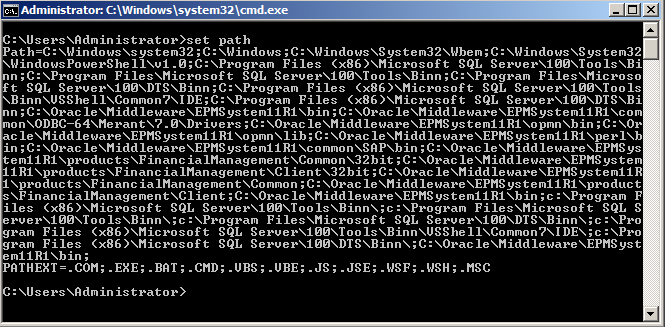
No reference to C:\Oracle\Middleware\oracle_common there and I think that is why the whole thing didn’t work.

The end

I think I have ten new grey hairs from all of this.  And if you wonder why I suffered through this
process, I have two Kscope14 sessions riding on a .500 environment.  It was either do or die.  Luckily this time I lived.  Again, I would never have gotten this far without John Booth's help.  Thanks, John!

Be seeing you.

Cameron

Monday, February 4, 2013

Patching 11.1.2.x the wizard way

Introduction

Yes, the thought of me writing much of anything on infrastructure is slightly (completely?) laughable given my fully documented and freely admitted serial incompetence in this area.  However, not everyone has the luxury of saying, “Damn it, Jim, I’m an application consultant, not an infrastructure geek” and truth be told I get pulled into these situations, at least tangentially, from time to time.  And of course because I’m in a roll-your-own one man consulting band, I have to occasionally patch my development system as well.

You are likely not in that spot (once upon a time the EPM market was full of we hardy independent souls – we now seem to be a vanishing breed of which only the fittest/most stubborn remain but I digress) and need to do the patching, or at least manage, or maybe just have an appreciation for what is entailed in the process of patching and maintaining your company’s not-architected-for-scaredy-cats EPM system.

If this is a task that strikes fear into your heart (actually, if it doesn’t strike fear into your heart, you’re not paying nearly enough attention) then you are in luck for Oracle Support (thanks, T.) have pulled out all the stops and have produced their very own Patching & Maintenance Advisor: Enterprise Performance Management (EPM) 11.1.2.x(1517258.1).

What’s it all about, Cameron?

It is a wizard-based (you wondered about the title of this post, I’ll reckon) approach to:
  1. Why you should patch (this isn’t too hard to fathom)
  2. How you patch (ah, the details, where Old Scratch lives)

The goal is to get you to carefully consider the potential  impact, possible considerations, and concrete actions you need to take, step by step, from a 11.1.2.NotEverPatchedNoWayNoHow release to the very latest version of 11.1.2.WowEvenOracleDoesn’tKnowAboutAllOfThesePatches.

My story of woe, agony, and defeat, that you can now avoid

I wish this had existed, oh, about two years ago when I was on my very first 11.1.2.0 Planning implementation.  The installing consulting company (whom I shall not name ‘cause getting sued isn’t in my list of things to do) insisted that patching was not necessary.  I thought this was likely one of the dumber things I had heard from a consultant’s mouth (and yeah, I’m a consultant and I say some pretty dumb things from time to time) but I had nothing to fight this with other than, “Why on earth would you not want to head off known issues?”  As you might imagine, he was Infrastructure, and I was Applications, and that battle was lost before it began.  It was fun a few weeks down the road whist watching the client put them through the wringer when things didn’t work.  That patching I wanted up front eventually happened but oh what a waste of time and effort.

If I had had a time machine to get this patch advisor (cf. Mr. Peabody’s Improbable History and yes, I look disturbingly like his boy Sherman) from the then future, I could have gone to each one of the sections of Support’s step by step guide and rebutted their every claim with the icing on the cake of, “Well, that might be what you say, but Oracle Support (you know, the vendor) says…”  Yes, I have revenge dreams and whoever gets to do this really ought to have pity on me and post their success to this blog’s comment section for my Schadenfreude moment.  :)  

What oh what does it look like?

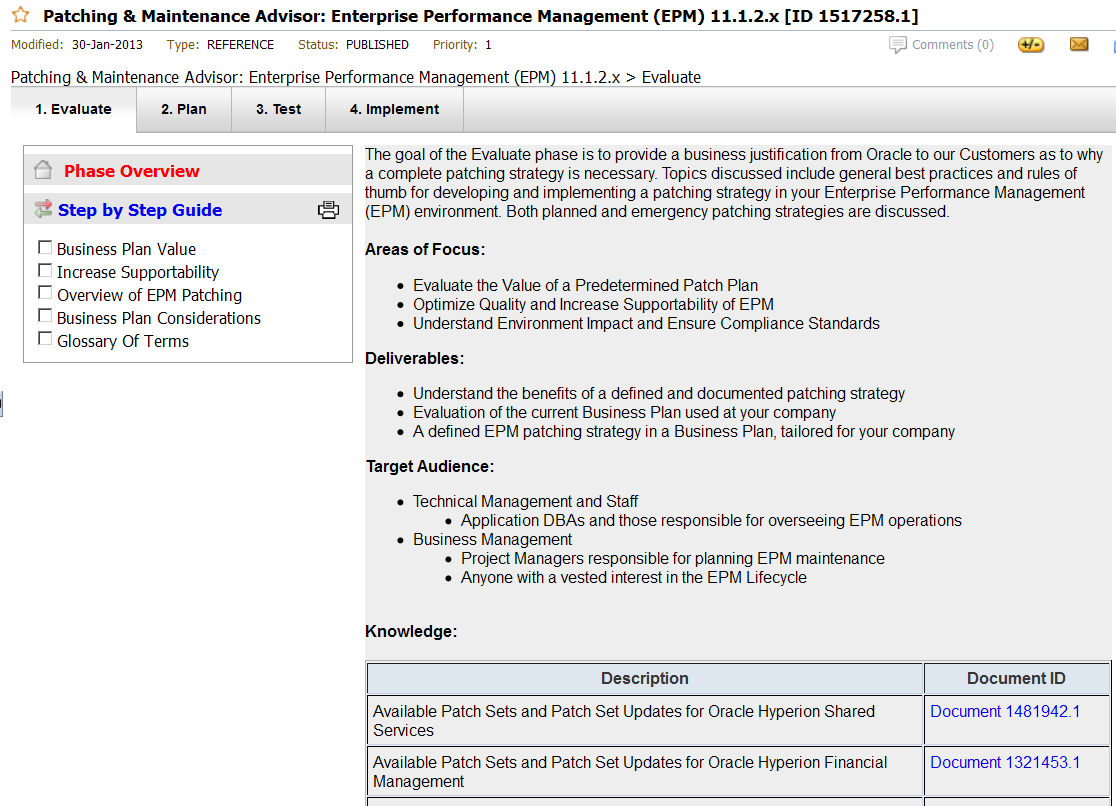
Just like this:

This is in line with other advisors I have written about before.  It is a wizard with subsections off to the left to show what needs to be completed in each section.

Wizard steps

Each overall phase of the patching process has individual step by step guides.  Every one of the guides takes you to a new document that, at the very least, provides food for thought.  And maybe ammunition against someone who maybe shouldn’t be in the installation game.  Ahem.

Evaluate

  • Business Plan Value
  • Increase Supportability
  • Overview of EPM Patching
  • Business Plan Considerations
  • Glossary Of Terms

Plan

  • Define Proactive & Reactive Patch Plans
  • Define Patch Test Plan
  • Define Patch Implementation Plan
  • Identify Patches / Patchsets to Apply
  • Read Patch Documentation
  • Assess Impact
  • Milestone Checklist and Feedback
  • Glossary Of Terms

Test

  • Apply Patch Test Plan
  • Verify Patch Install Has Been Successful
  • Verify That Backup / Recovery Works
  • Document Lessons Learned
  • Milestone Checklist and Feedback
  • Glossary Of Terms

Implement

  • Verify That Backup / Recovery Works
  • Apply Patch Implementation Plan
  • Verify Patch Install Has Been Successful
  • Milestone Checklist and Feedback
  • Glossary Of Terms

Pretty comprehensive, eh?  The advisor really spoon feeds the whole patching process.  Thanks, I need all the help I can get and I suspect I am not alone.

But wait, there’s more

Would you believe there are more goodies to be had?  As they might say at my current client (bonus points if you can place this by US state), you betcha.

What oh what oh what are the patches for each one of our beloved EPM products?  There’s a very nice and concise list of links to all of the patches (you can sort of see part of it in the screen shot above).  Of course it is now a pretty rare thing that only one product is being used at a time (I would say almost impossible given how Shared Services and sometimes EPMA are part and parcel of practically every implementation).  Would these have been handy during my losing argument with the installer, mighten it?  You betcha again.

DescriptionDocument ID
Available Patch Sets and Patch Set Updates for Oracle Hyperion Shared ServicesDocument 1481942.1
Available Patch Sets and Patch Set Updates for Oracle Hyperion Financial ManagementDocument 1321453.1
Available Patch Sets and Patch Set Updates for Oracle Hyperion Reporting and Analysis, Financial Reporting and Interactive ReportingDocument 1360962.1
Available Patch Sets and Patch Set Updates for Oracle Hyperion PlanningDocument 1395593.1
Available Patch Sets and Patch Set Updates for Oracle Hyperion EssbaseDocument 1396084.1
Available Patch Sets and Patch Set Updates for Enterprise Performance Management Architect and Calculation ManagerDocument 1400076.1
Available Patch Sets and Patch Set Updates for Hyperion Financial Data Quality Management and FDM ERPI IntegratorDocument 1400561.1


Did you know there was a Hyperion Patch Reviews Community?  Nope, neither did I.  But now we both do.

May this bring an end to these questions on OTN

I am not totally sure why OTN (and to a lesser extent, Network54) has become the home of infrastructure-related questions when there are so many good resources in Oracle Support.  The two Johns (John Goodwin and John Booth) seem to answer most of these but I have to wonder if the original posters even bothered to look on Support.  Remember, if your company has an EPM product (actually, any Oracle product) you at least have read access to Support.  The answers Support come up with are the official word (this stuff gets vetted through a process ever so slightly more rigorous than OTN or Network54 or this blog) and ought to be at the very least your starting point for all things infrastructure.  With this patch advisor, I hope to never see (and never post myself) another patch question on OTN.

Be seeing you.

Friday, March 2, 2012

Stupid Programming Tricks #11 – OPatch RTM

An easier way to figure out if Essbase (and everything else) is patched

Remember the last post’s twists and turns to figure out the Essbase patch?  Oh, if only I could have been bothered to RTM.  Yes, it is sad that I still do this but there it is.

It’s so easy, even an Essbase/Planning/ODI consultant can do it

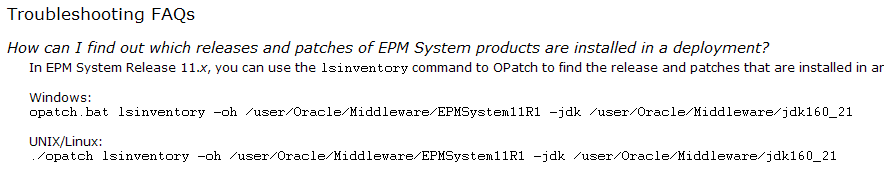
It’s right there in the documentation, in the very last section of the documentation (actually, it’s in all of the EPM patch readmes and is called Troubleshooting FAQs (this is EAS’ ReadMe but they’re all the same).  Hmm, maybe reading all the way to the end of the documentation is beyond the ability of mere non-infrastructure consultants.  It’s at least beyond me.  I feel so…dumb.  Had I simply read further in documentation, I would have seen this:

Huh?  You mean that OPatch can tell me what’s patched?  Sort of makes sense, doesn’t it?  Duh, again.

There’s a twist.  Of course.

I can’t speak to the UNIX/Linux command as my development environment is Windows, but this command looks an awful like not-Windows:

And in fact, it doesn’t work:

But you know what does?
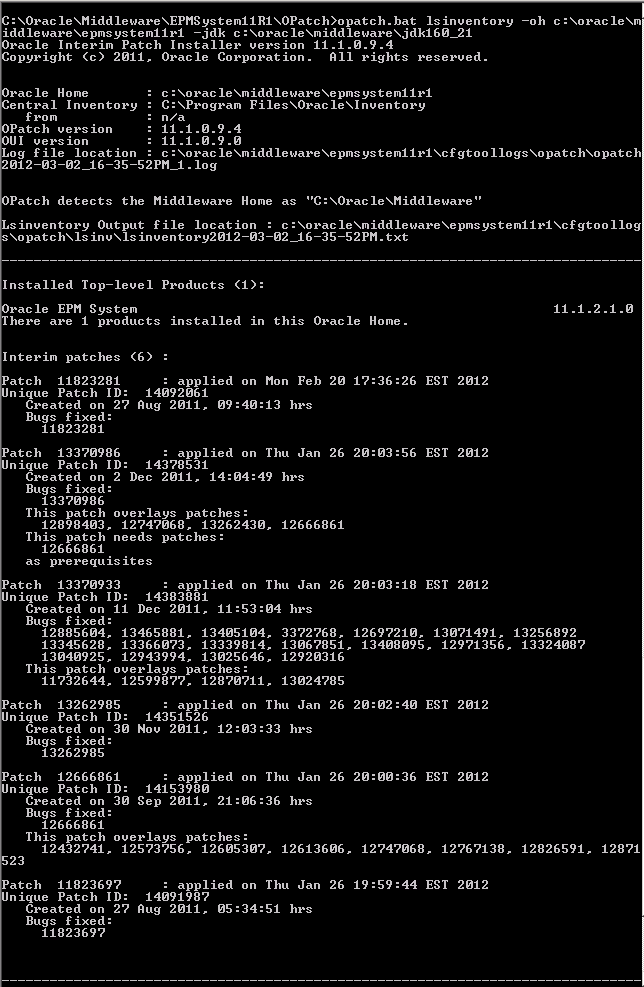
C:\Oracle\Middleware\EPMSystem11R1\OPatch>opatch.bat lsinventory -oh c:\oracle\middleware\epmsystem11r1 -jdk c:\oracle\middleware\jdk160_21

Yup, it works.  Hurray, huzzah, three cheers for OPatch, etc.

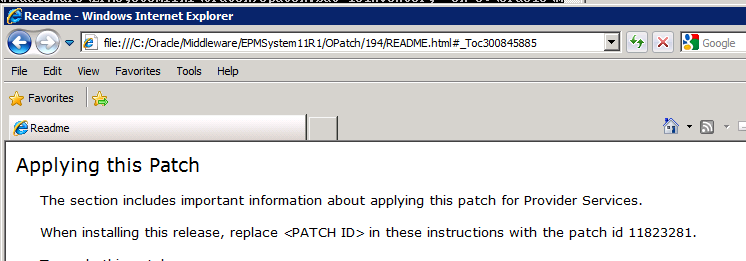
I only need to look in the APS ReadMe to see that the patch number is 11823281.  

And what do we see in the output of opatch’s lsinventory?

Guess what?  The APS 11.1.2.1.102 patch is applied.

NB – I had to apply that patch but of course had no idea that OPatch had the lsinventory command.  So please note that John’s Planning AMI has Essbase 11.1.2.1.102 but not APS 11.1.2.1.102.  

What have we learnt?

Read
The
<insert whatever expletive  you wish, I am keeping this SFW>
Manual

Popular Posts