Showing posts with label Windows. Show all posts

Friday, March 2, 2012

Stupid Programming Tricks #11 – OPatch RTM

An easier way to figure out if Essbase (and everything else) is patched

Remember the last post’s twists and turns to figure out the Essbase patch?  Oh, if only I could have been bothered to RTM.  Yes, it is sad that I still do this but there it is.

It’s so easy, even an Essbase/Planning/ODI consultant can do it

It’s right there in the documentation, in the very last section of the documentation (actually, it’s in all of the EPM patch readmes and is called Troubleshooting FAQs (this is EAS’ ReadMe but they’re all the same).  Hmm, maybe reading all the way to the end of the documentation is beyond the ability of mere non-infrastructure consultants.  It’s at least beyond me.  I feel so…dumb.  Had I simply read further in documentation, I would have seen this:
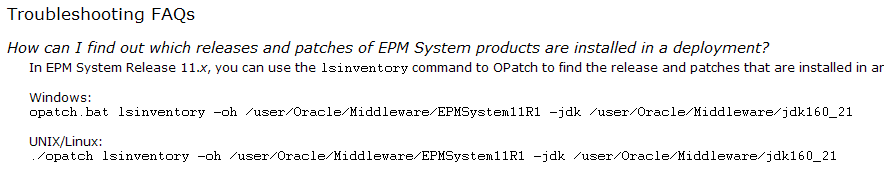
Huh?  You mean that OPatch can tell me what’s patched?  Sort of makes sense, doesn’t it?  Duh, again.

There’s a twist.  Of course.

I can’t speak to the UNIX/Linux command as my development environment is Windows, but this command looks an awful like not-Windows:

And in fact, it doesn’t work:

But you know what does?
C:\Oracle\Middleware\EPMSystem11R1\OPatch>opatch.bat lsinventory -oh c:\oracle\middleware\epmsystem11r1 -jdk c:\oracle\middleware\jdk160_21

Yup, it works.  Hurray, huzzah, three cheers for OPatch, etc.
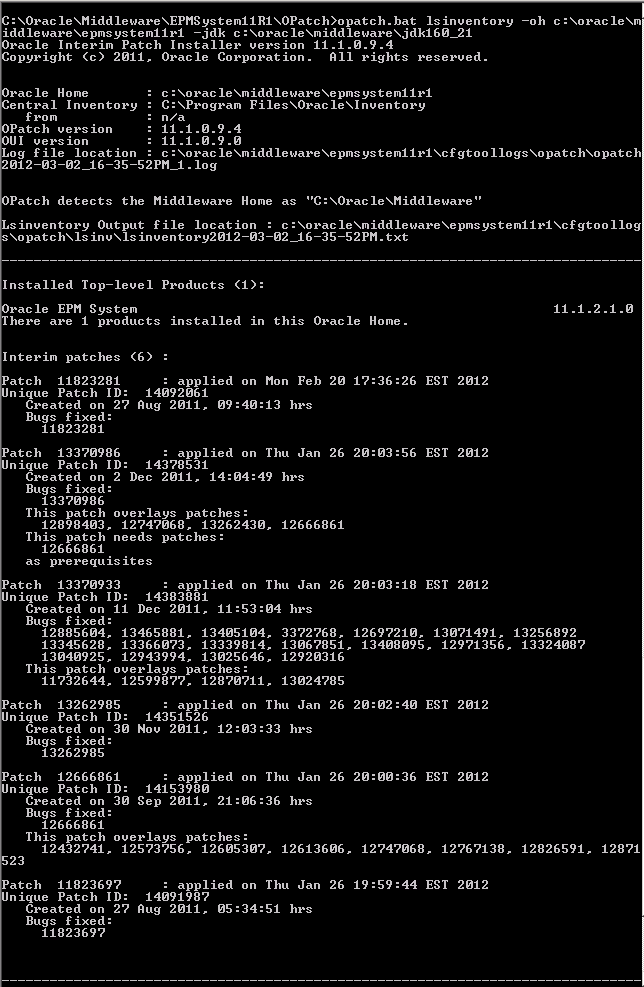
I only need to look in the APS ReadMe to see that the patch number is 11823281.  
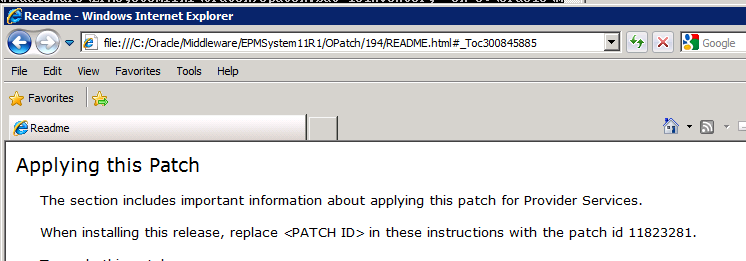
And what do we see in the output of opatch’s lsinventory?

Guess what?  The APS 11.1.2.1.102 patch is applied.

NB – I had to apply that patch but of course had no idea that OPatch had the lsinventory command.  So please note that John’s Planning AMI has Essbase 11.1.2.1.102 but not APS 11.1.2.1.102.  

What have we learnt?

Read
The
<insert whatever expletive  you wish, I am keeping this SFW>
Manual

Thursday, March 31, 2011

Stupid Programming Tricks #8

Introduction to the introduction

I wrote this (or as you’ll see in a minute, I didn’t  write this) quite a while ago and was holding off on releasing it because…well because I had other things to post.

Now I see that Robb Salzmann has posted something pretty similar to what I-didn’t-but-someone-else wrote.

Think of this as an alternate take on his post, or his post is an alternate of this post.  You decide.

Introduction

Are you an Antimimetic or a Mimetic?  In other words, does art imitate life, or life imitate art?  

I’m pretty sure my name isn’t Tom Sawyer, and yet I manage to get others to whitewash Aunt Polly’s fence.

This time it’s Frank Chow who’s done all of the hard work.

The problem

Set substitution variables for the current Actual month and year.  Big deal, right?  Any automated system worth its salt does this.  

But where do those dates come from?  Manual assignment?  Magic?

Frank went for code (Is there really any other way?) and had an additional requirement – that the current month increments on the 25th of the month.  And oh yes, and it had to handle the extra-special case of January.

NB – The fiscal year is the same as the calendar year.  It has to be for the solution below to work as you’ll shortly see.

The solution

DOS will never die, will it?  It is breathtakingly cryptic and quite powerful in its limited way.  What’s not to love?  

Let’s dive in:

Setup the Day, Month, and Year variables

:: ********************* Set up the Day, Month, Year Variables **************************
   FOR /f "tokens=1-4 delims=/ " %%a in ('date /t') do (
    set day=%%a
    set mm=%%b
    set dd=%%c
    set yy=%%d
    )
                                                                             
 set /a pr_mm=%mm%-1
 set /a pr_yy=%yy%-1
Pretty cool stuff here – the code is stripping the output of date /t using the backslash as a delimiter and then putting the day, month number, day number, and two digit year into four temporary variables.

Setting up the strings

:: ***************** set up mapping table ************************
  set monthmap=00-Dec;01-Jan;02-Feb;03-Mar;04-Apr;05-May;06-Jun;07-Jul;08-Aug;09-Sep;10-Oct;11-Nov;12-Dec
::*************** set current month variable ************
 CALL SET cur_month=%%monthmap:*%mm%-=%%
 SET cur_month=%cur_month:;=&rem.%

::*************** set prior month variable **************
 CALL SET pr_month=%%monthmap:*%pr_mm%-=%%
 SET pr_month=%pr_month:;=&rem.%

echo current_month: %cur_month%
echo prior_month: %pr_month%

::*************** set current & prior year variables ***********
 set cur_yr=FY%yy:~-2%
 set pr_yr=FY%pr_yy:~-2%

echo current_year: %cur_yr%
echo prior_year: %pr_yr%
Here a key-value pair is used with CALL SET to translate the month numbers in the variable %mm% to three character strings and is also used to append “FY” to the two digit year values in %yy%.

Here’s a good guide to string manipulation.  You’ll find a section similar to the above in the example called “Map and Lookup - Use Key-Value pair list to lookup and translate values”.

Handle month end and January special case

::************ set up CurrActMonth & CurrActYear variables ***************                                                                                         
 IF %cur_month% EQU Jan goto Var_Jan
 IF %dd% LSS 25 goto before25
 IF %dd% GEQ 25 goto after25
 
:Var_Jan
 IF %dd% LSS 25 goto before25_Jan
 goto after25

:before25_Jan
 SET CurrActMonth=Dec
 SET CurrActYear=%pr_yr%
 goto End
  
:before25
 SET CurrActMonth=%pr_month%
 SET CurrActYear=%cur_yr%
 goto End
  
:after25
 SET CurrActMonth=%cur_month%
 SET CurrActYear=%cur_yr%
 goto End
:End

echo CurrActMonth: %CurrActMonth%
echo CurrActYear: %CurrActYear%

Ever wonder what the DOS commands are for >, >, <>, etc.?  Check them out here.

Run it if needed

:: ***************** Excute the MAXL script if the date is 25th ***********************
 IF %dd% EQU 25 goto MAXL_update_date
 exit

REM /============ excute MAXL script to update the Substitution Variables ======================/
:MAXL_update_date
 essmsh SubVar_CurrActMonth_Year.msh
This code gets run every night.  If it’s the 25th, run the MaxL code, otherwise exit.

Do it in MaxL

/* --------------------------------------------------------------------------
*  LOGIN AND SETUP SCRIPT VARIABLES - &CurrActMonth and &CurrActYear
* -------------------------------------------------------------------------- */

/* NB -- user, password, and server are set up separately as Windows
  environment variables.    */
login "$ESS_USERID" "$ESS_PASSWD" on "$ESS_SERVER";

/* ---------------- SET UP SUBSTITUTION VARIALBES --------------------------- */
alter system set variable 'CurrActMonth' $CurrActMonth;
alter system set variable 'CurrActYear' $CurrActYear;

logout;
exit;
Remember, the Windows CMD script code set the temporary OS environment variables CurrActMonth and CurrActYear.  These are referenced in MaxL with a “$” in front of the variable name.

Conclusion

This code does three things:
  1. Figures out the current month and year based on system date
  2. Uses some cool DOS functions
  3. Sets Essbase substitution variables if it’s the 25th of the month and oh by the way handles year end pretty well


Frank asked me what I thought about it – was it any good, could I make improvements, etc.  Some say the greatest form of flattery is imitation.  Is ripping code off and using it yourself an even greater form of flattery?  Whatever your definition, I plan on using this code when I have the same need.

You can get the whole code stream here.  Run it with the PAUSE statements in to understand what it’s doing – take those statements out when you want to use it.

Tuesday, October 26, 2010

Stupid Programming Tricks #4

Introduction

This is number four in my series of short tricks and tips. 


I debated about the utility of this until I spent an hour trying to figure out how to search MaxL scripts with Windows Explorer’s Search function.


The fix is easy and oh so useful.

What am I trying to do?

Let’s say I want to find all of the MaxL scripts that use the “spool” command.


If I searched all of the .txt files in a given folder, Explorer’s Search function would give me a nice list of files that contain the string “spool” in the file body. 


To prove this, I renamed a MaxL file so that it has an extension of .txt.


Here are the results:


But if I search the same folder for the same file with a .msh extension I get this:


Of course, I could:

1)    Find every MaxL script (in my world, they end with a .msh, and yes, that is important) in a given folder, harddrive, computer, etc.

2)    Open up every one of those MaxL scripts and search within for “spool”.

3)    Do an Oedipus Rex and take out my eyes with knitting needles in a completely non-Freudian way because of the despair, ennui, and avoir le cafard that steps one and two engender.


But there is a Better Way.  The cockroaches of Sidi-Bel-Abbes will thank me for that one.

Don’t fear the Registry

Go to the Start->Run menu and type regedit.


A key is required

If you’ve already changed .msh files in Explorer to open with Notepad or my personal favorite TextPad, this step isn’t necessary as  the main key will exist in the registry.


Add a new Key:


The Registry Editor will stick this new key at the bottom of the list – don’t worry about the order.


Rename the selected text to .msh and hit Enter.


Tell Search to look inside .msh files

Add another new key to the .msh key – I guess you could call this a subkey – by right clicking on .msh.


Here’s what it looks like:


Now give that key a default String value:


It is not going to be set by default.


Right click on (Default) and select Modify.


Now we need to give the Default key a very specific value.  Just copy and paste this into Regedit:

{5e941d80-bf96-11cd-b579-08002b30bfeb}


After you click on OK, you should see the following:


Log off and log back on; rebooting shouldn’t be necessary.

Conclusion

Search now lets you look inside .msh files.


Not a big deal, or the world’s best hack, but it sure is a nice way to search for a string within a non-standard file type.  Of course you can extend this technique to .csc, .rep, and .whatever files you need to scan.  Useless 99% of the time, but when you need it, you need it.


Happy hacking till next time.

Popular Posts