Showing posts with label stupid trick. Show all posts

Monday, August 22, 2016

Stupid Programming Tricks No 29, part 2 -- Dynamic Load Rule columns

Where we were or where are  we or most importantly where am I?

I have no idea as to the last point but then again I never do.  Ever.

Moving on, in the first part of this exciting (surely not but at least useful) series, I related how to stack dimensions in a single column.

Alas and alack, My Man In California, Glenn Schwartzberg, pointed out in the comments to that post that he had already covered this at two different Kscopes.  Oh the shame, but as a soon-to-be-ex-board member the number of sessions I get to attend is severely limited.  Sorry, Glenn.  I had to figure it out on my own.  I never do things the easy way.  Ever.  Again.  Bugger.

The Network54 use case I addressed was primarily a need to both stack dimensionality as well as selectively address more or fewer columns of data depending on data scope.

This is quite easily done in a Load Rule, indeed it’s possible in both a SQL as well as text Load Rule and it all centers around how the initial record of a Load Rule.  The Stupid Trick here is that if ten data columns are defined at design-time and only five are passed at load time, the Load Rule ignores the last five.

One might think that this would be best accomplished by changing the SQL query within the Load Rule but by doing that one would edit the Load Rule itself, this would be a design-time change , and the number of columns would be modified.  I’ll also mention that Load Rules are tricky little buggers that just beg to go FOOM! so I’m loathe to modify them.  

Instead, a SQL view that changes the scope of the columns passed to the Load Rule’s SELECT (well, you have to skip the “SELECT” but that’s the action the rule performs) * FROM viewname and ta-da, the Load Rule now selects fewer (or even more with an important caveat) data columns.

That caveat

This more-or-less Load Rule behavior is predicated on the columns that are defined within a SQL view.

I take the point, perhaps even before you’ve raised it, that modifying the SQL is a design-time change.  But with these requirements something and somehow is going to change.  Load Rule or ALTER VIEW?  One man’s meat is another man’s poison so it’s time to pick yours.

What kind of poison for the evening, sir?

I’ll have just a wee slice of SQL:
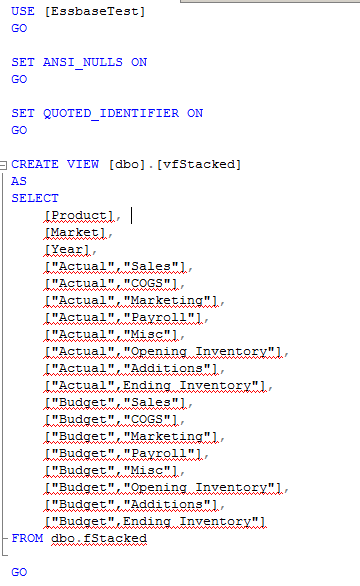
Pulling this in a SQL Load Rule looks like this:
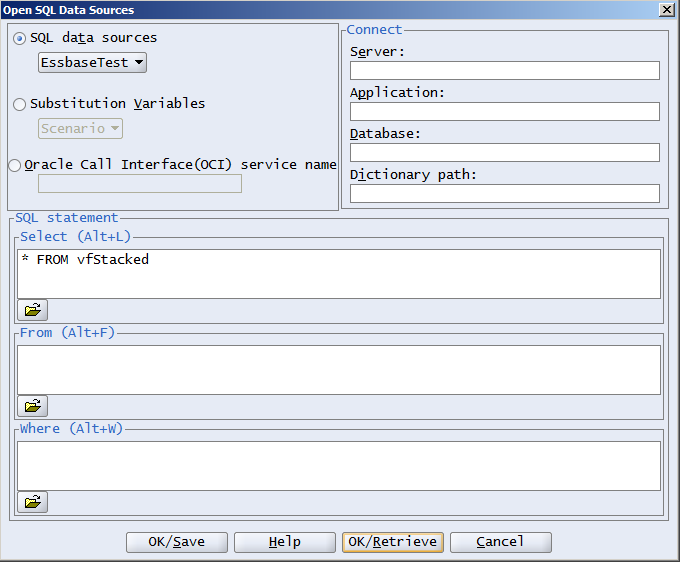
And this:
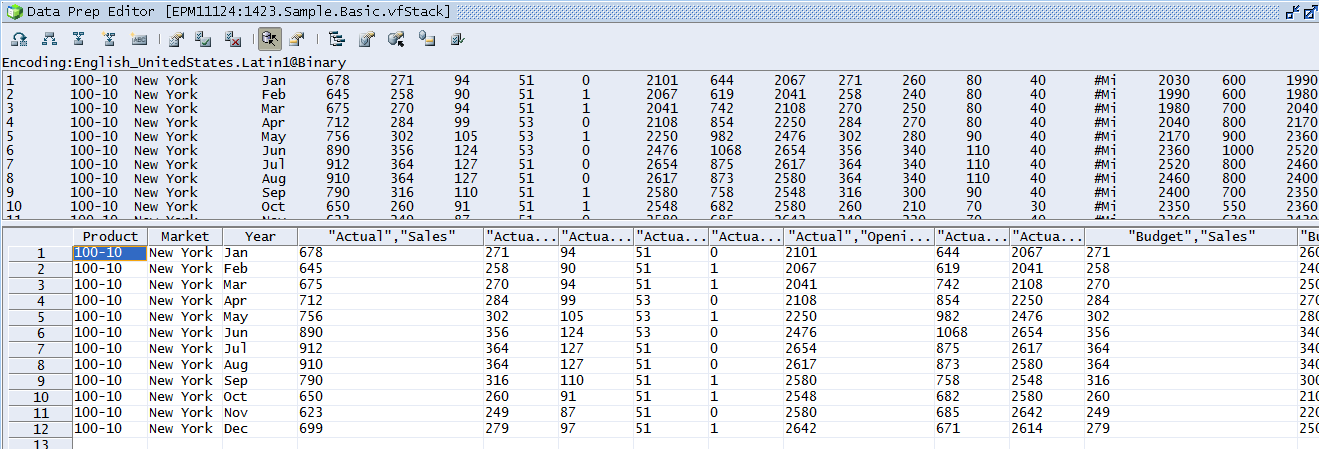
So no different than the original fStacked table which is in turn no surprise given that the fields are the same in the view as they are in the table.

Let’s cut that view down to just Actual columns:
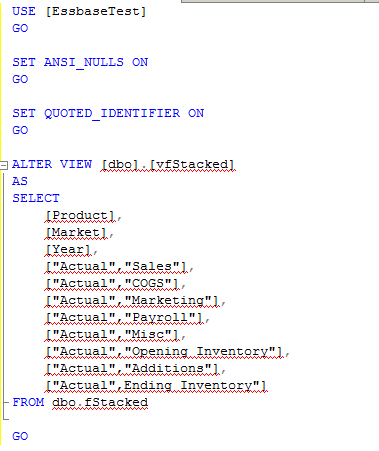
Et voilà!, dynamic Load Rules
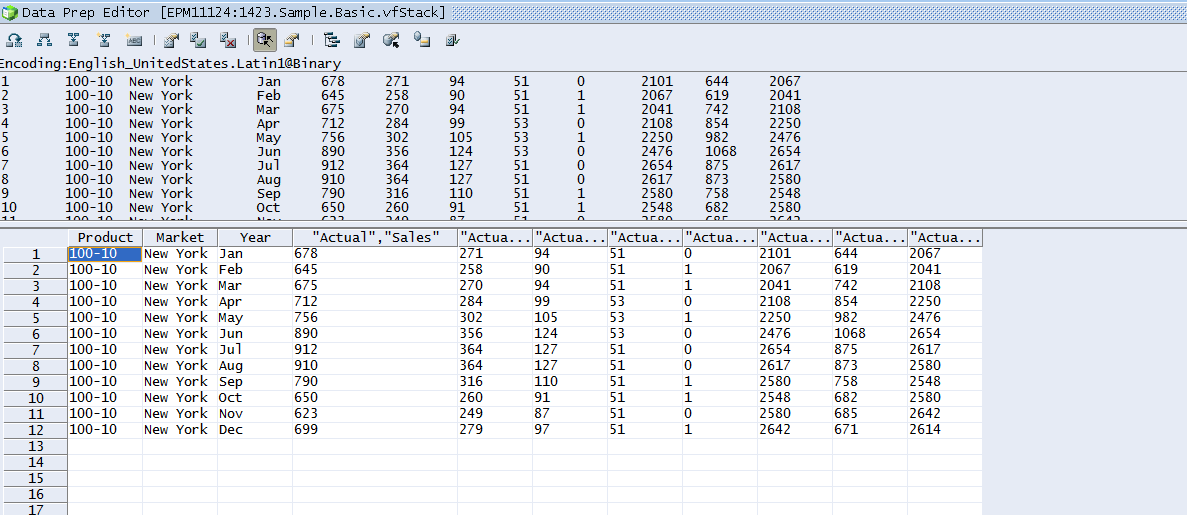

Change the SQL in the view, no change to the rule, change the data columns and thus scope, all with no editing of The Devil’s Own.  Gee whiz, could it be that Load Rules aren’t spawn from Old Scratch?  Maybe.

Would I do it this way?

Let’s review what this approach does:
  • It stacks dimensions in a column, i.e. it allows more than one dimension to be defined for each column of fact data.  That’s not a condition of dynamic Load Rules but instead is a requirement of that post way back when in part 1.
  • It shows that removing or adding columns to a data source make the Load Rule display more or fewer columns.

The caveat to the above approach is that the definition of the Load Rule’s columns must happen before the data change and the maximum number of possible columns needs to be defined up front.  

If this last bit seems odd, think what happens when you load a poorly defined text file such as when you’re told, “There are 13 columns of data,” but in fact there’re really 14 columns 2,312 records down although not in the first 2,311 rows.  Whoops, someone forgot to mention that and because the Load Rule defines columns based on its initial 50 row read (yes, you can change this and even the starting position but you’d have to know the exact row to go to) Essbase is going to throw a rod because it doesn’t know how to handle data column 14.  The damnable thing of it is if the Load Rule can’t see the column, the Essbase geek can’t add it.  The “fix” is to create a one record file that has that 14th column, tag the column as Ignore During Data Load, and for the 2,311 preceding rows it’s as if that column doesn’t exist (remember there is no tab or comma delimiter at the end of those 13 fact field records) until record 2,312.  This is the same concept as the “Budget”,”Sales” columns defined when the data exists and then being dropped when the data source no longer contains said columns.

Whew.

So what do I do?  Benchmark.  I’d benchmark this approach, particularly the full Actual and Budget load example vs. two separate Load Rule streams, one of Actual and the other of Budget.  And as this is an ASO cube, I’d kick that latter approach off in multiple MaxL statements writing the contents to a single buffer.  Is the performance issue tied to how fast Essbase can commit a temporary tablespace to a permanent one or is it how big the pipe from the fact source is?  Dunno till tested.  

If a two stream approach worked, there’d need to be some kind of conditional branching in the batch script to decide which or both to load.  

Whew, again.  No one said that system requirements are easy.  That’s why we’re (hopefully) paid the big (even more hopefully) bucks (insert currency of your choice).

Be seeing you.

Friday, September 18, 2015

Stupid Programming Trick No. 25 part C -- Hybrid allocations purely in BSO


The high, the low, and the Perry Como

Sometimes I wonder why I make these parenthetical references when it seems all too likely that Mr. Smooth and Calm aka Mr. C is an unknown quantity to anyone under the age of, say, 70.  And me.  In any case, for those of you brave enough to click here , here, and here you will now have at least some appreciation for music of a calmer nature.  Isn’t life hectic and unpleasant enough?  Wouldn’t some nice, gentle, soothing singing, akin to a Nice Cup of Tea, be warranted?  

Of course, if you can’t stand the above,  check out Eugene Levy's (special thanks to Bob Rhubart for getting the name right) absolutely devastating parody on SCTV.  And yeah, SCTV is also something no one under the age of 40 would likely even know unless you are a fan of Canadian humour (see what I did there?).  Of course if you’re really a fan of all things Canadian, and in particular a fan of The Maritimes, and a fan of brotherhood, and a fan of a pretty high level of slapstick, and a fan of general insanity, I suggest you check out Trailer Park Boys.  My yet-another-brother-from-completely-different-parents and fellow ODTUG board member, Martin D’Souza, hates that show.  How can he be Canadian as it is a national institution?  Perhaps because he has a brain that he actually uses?  You decide.

Perry Como?  What about Gaius Julius Caesar?

Did you know that Caesar has a Twitter account?  Never discount the descendant of Venus, conqueror of all Gaul, dictator for life.  Follow him on @Julius_Caesar.
   
Oh, and since I have bastardized his immortal words during the triumvirate of this series on allocations in Hybrid Essbase, check out this fairly awful Latin quote:
Hybrid Essbase serpit sunt divisa in partes tres, quarum unam incolunt horrendis file parsing, altera CDFs, qui in sua lingua vetus figuratus calc scripts noster BSO calc cumulus script, odiosis tertia. Haec inter se differunt secundum formam aditu codice, et complexionem. Horum omnium fortissimi sunt BSO calc scripts sunt simplicissima.

I pinky promise that this blog will henceforth have a much smaller smattering of Latin.  Like none.  It was fun while it lasted but I think I’ve exhausted this particular vein.  Or…
I russam defricare proponis blog erit deinceps regia a multo minore smattering linguae Latinae. Tamquam nihil. Pugnatum erat fun dum puto me hoc exhaustis venae.

:) or maybe that should be :P

As always, check for the translation at the bottom but in the meantime Read The Whole Thing.

Enough of the palaver, on to the show

Sorry for the above, but I’m working on four hours of sleep because of a project – sleepwise, this is like Kscope but without fun – and yr. obt. svt.’s writing filter is firmly turned off.  

What is switched on is the realization that you have seen two approaches to Hybrid allocations:  mine, which makes pigeons weep because its horrific nature, and Peter Nitchke’s that uses ultra uber super duper cool Calculation Manager CDFs in an Essbase calc script (NB – Oracle’s Sree Menon is a friend to all Essbase and Planning practitioners for his creativeness and enthusiasm in working with the non-Oracle world) which is…complicated albeit cleaner.  

This is a post that sits somewhere in the middle – not awful, not cool, but instead, like Perry Como, simple, straightforward, and not a challenge to your brain.  Think of this as the middlebrow approach approach.  Did I mention it’s also pretty fast.

Accumulate the positive, eliminate

Satish M over on Network54 noted that he used an accumulation approach to getting totals to do allocations and it was blazingly fast.  My older, smarter, undoubtedly cooler, and completely not actually related older brother, Glenn Schwartzberg also mentioned this after the debacle of my first approach.  

What does this look like?

Easy peasy, lemon squeezy

It really couldn’t be easier.  Use what Glenn likes to call a loop to iteratively add, only in the BSO layer of a Hybrid database, the totals of Market and Product into those same No Market and No Product members.  Yes, it uses a mildly horrific cross dim on the left side of the the equation and yes it has to happen within a member formula but it’s actually pretty straightforward.

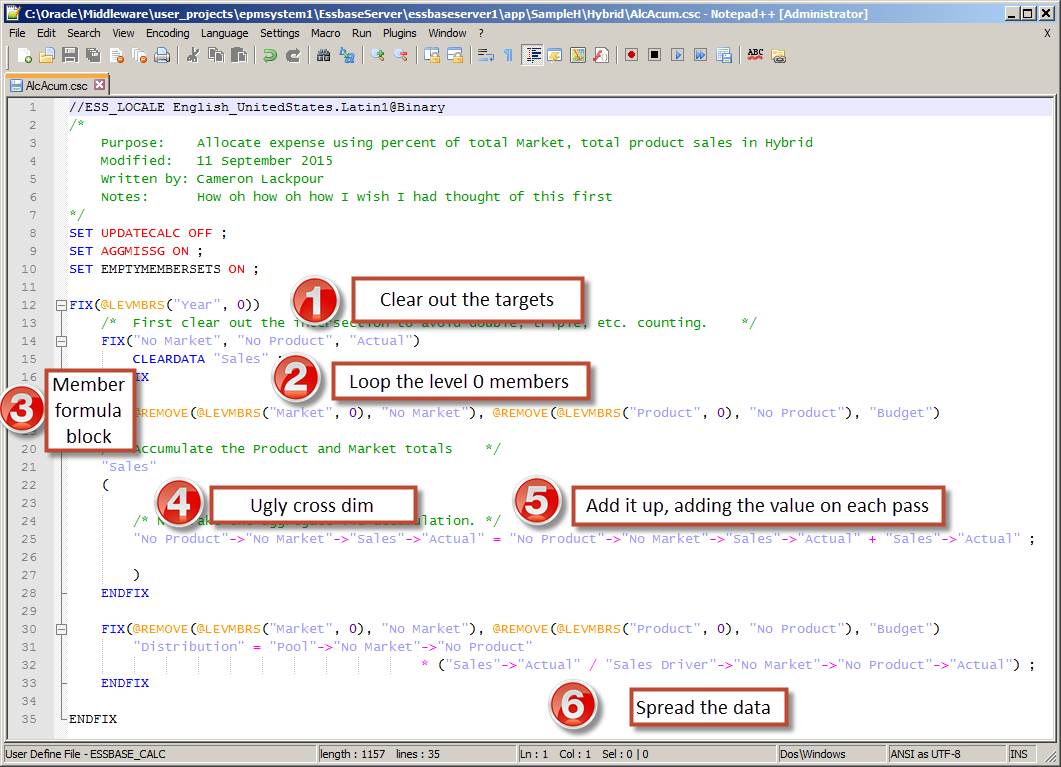
The code itself


Let’s take it apart bit by bit.
  1. Before this runs, the target No Market, No Product, Actual Budget v must be cleared out or each subsequent run will double, triple, quadruple, etc. count the totals.
  2. Loop the level zero members to touch all of the existing members.
  3. Define a member formula block to allow the left hand cross dimensional indicators.
  4. Write that ugly cross dim to stick the totals into No Product, No Market, Sales, Actual.
  5. In No Product, No Market, Sales, Actual, add each member’s value as the loop of members occurs.
  6. Allocate the Distribution Pool to level 0 Budget Products and Markets.

Ta da, it’s done.  Pretty easy, no?  I sure wish I had come up with this initially but you have to admit, the other approaches are pretty epic hacks.  

Wot’ll she do, Mister?

Pretty fast, is what.  Tim German aka @CubeCoderDotCom tested this on the same Hybrid cube we used in our Kscope15 calculation aproach scorecard presentation and found that it ran in about eight to nine seconds.  Comparing that to my insane six second export, parse, import process we can observe that Hybrid’s ASO aggregation engine is faster than BSO – no real surprise there and the promise of Hybrid.

And there you have it:  three different approaches to allocations in Hybrid.  What does yr. obt. svt. like the best?
  1. The extract, parse, import and calculate process was fun, kind of, to write but it should really never, ever, ever be used.  It fails.
  2. Peter Nitschke’s approach is far, far, far cooler.  I don’t have exact timing on this as it hasn’t been tested on same database, but I expect it to be blindingly fast because it too uses the ASO aggregation engine.
  3. This last accumulation approach is the most understandable pure Essbase way of doing things.  While slower, I think it’s likely the way most people will approach this use case.  Having said that, I encourage you to use Peter’s way because of its performance.  And utter badass coolness.

And now the last bit of semi-prententious Latin translation

Hybrid Essbase spreads are divided into three parts, one of which is inhabited by horrendous file parsing, the other CDFs, those who in their own language are old fashioned calc scripts, our BSO calc accumulation script, the boring third. All these differ with one another in the form of approach, code, and complexity.  Of all these, the BSO calc scripts are the simplest.

Videat, tibi.

Monday, May 5, 2014

A Stupid Excel, Plannning, and Cameron Trick

Will I ever learn?

Will I?  Will I?  Sigh, no, apparently I will not.  I cannot believe I didn’t catch this before.  I have been struggling with this for, oh, about 6 years (whenever 11.1.1.1 came out and with it outlineload.cmd).  I am actually really and truly mad at myself for not knowing this.  Idiot.

The background

During a long, troubling, stressful, and not particularly fun weekend (sorry for the whine but not knowing this really frosts my cookies) trying to get ASO Planning to do something it just cannot do for my KScope14 session, I stumbled across this simple solution to Planning outlineload.cmd files in Excel.  

The problem

When a member has a comma or special character in it on metadata export (outlineload.cmd and with 11.1.2.3, Planning itself will export dimensionality) Planning will wrap double quotes around the member or alias so that it can correctly parse the field and the record on the way back in.  What happens then in Excel (I tested on Excel 2010 but this has been the way it’s worked since at least Excel 2003 and probably before) is this:

In case you can’t tell, an Account with the member name Depr,Taxes,Insur. Is spread over multiple columns in Excel where in fact it should be in the Parent column.

What’s even weirder is that the member name is in the correct column.  See the yellow highlighted cell A477.  So what’s up with the pink highlighted data in A478, B478, C478, and actually just about everything else in row 478?

A quick look in Notepad++ shows little difference.  Or at least one it took me literally almost forever to spot.  Idiot.

Goofus and Gallant

The bad

The good

The test with the answer

Do you see it?  Do you?  Please don’t be as blind as I was.

The answer is spaces.  Or more specifically, spaces after commas.  That’s it.

Bad, bad, bad

Metadata-comma-space-metadata is bad.

Depre, "Depr,Taxes,Insur.", Depreciation, false

Good, good, good

Metadata-comma-metadata is good.

Depre,"Depr,Taxes,Insur.",Depreciation,FALSE

The end of this Stupid Trick

That’s why even in the bad file the first instance of Depr,Taxes,Insur. worked in cell A477 but blew up in B478.  Record 477 didn’t have a leading comma-space as it was the first field in the record.  Record 478 did because it is the second column and had that infernal comma-space preceding it as a delimiter.   This difference in behavior in Excel was the clue that made me finally realize that maybe there was an issue with the way the delimiting was working.

I should also note that I looked around for a definition of comma-delimiting and I could not find:
  1. Any document or standard that said that spaces should or should not follow the delimiting commas.
  2. Any document or note regarding Excel that stated that Excel works this way.

I can’t believe I am the first to recognize this or figure it out and document it.  Perhaps this is all so obvious that world+dog already know it but it eluded me, hence this post.

To plainly state the solution to this incorrect delimiting in Excel:  All you have to do is go into a text editor and search for comma-space and replace it with plain commas-no space before you import it into Excel.

That second good file?  It’s the result of that search and replace.

Arrrgh, soooooo frustrating.  At least I have one positive thing coming out of this weekend.  May you never make this mistake.  I have a sneaking suspicion that most of you already knew this.  Double arrrgh.

Be seeing you.
Monday, February 17, 2014

A modest man with much to be modest about, or Yet Another Stupid Excel Trick

How do I know when I’ve spent too much time in Excel?

When I see this:


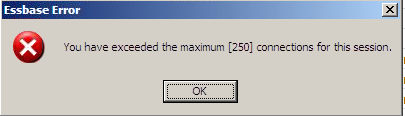
That’s a Classic Essbase Excel add-in message and proof that I was doing waaaaay too much analysis of a particularly knotty data issue.  In almost 20 years of Essbase work (most of it with the add-in) I have never managed to get that error message.  I took it as a note that it was time for me to stop and take a coffee break.


But that’s not what this blog post is about.  What this blog post is about Yet Another Stupid Excel Trick because of Yet Another Manual Process.


I must give mention of Mabel Van Stone who tried to warn me of this issue.  As usual, I heard it, but didn’t hear it.  Now I am going to write it.  Maybe this time it will actually sink in.

The hell that is linked workbooks

If you read my last blog post on this subject, you’ll know that I am not exactly a terrific fan of linked Excel workbooks because of the potential of completely mucking up the data.


I also am not exactly a terrific fan of:  mean people, stupid people (although on reading this post you may be convinced that I am part of that group), injustice, bad coffee, and a whole host of other things.  Me not liking them matters not a jot as they exist with or without my approval.  What does matter is knowing what defines “bad” and then firmly following one of two paths:  avoidance of things I cannot change (and grudging acceptance therof) and the complete eradication and expiration of the things I can change.  Sometimes run and hide is the answer, other times violence is the answer.  Yes, I am a simple man.  What I am about to illustrate falls into the former category.  


Source and linked target open at the same time

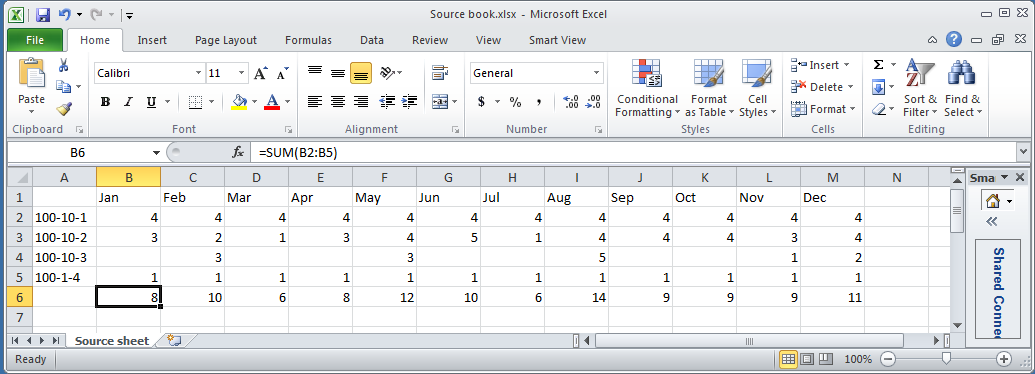
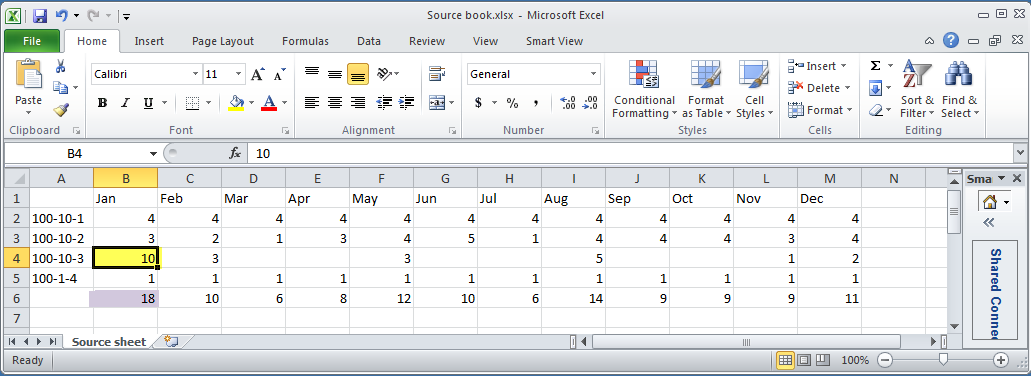
Let’s begin with a simple (hah!) example of linked workbooks, this time with both workbooks open.

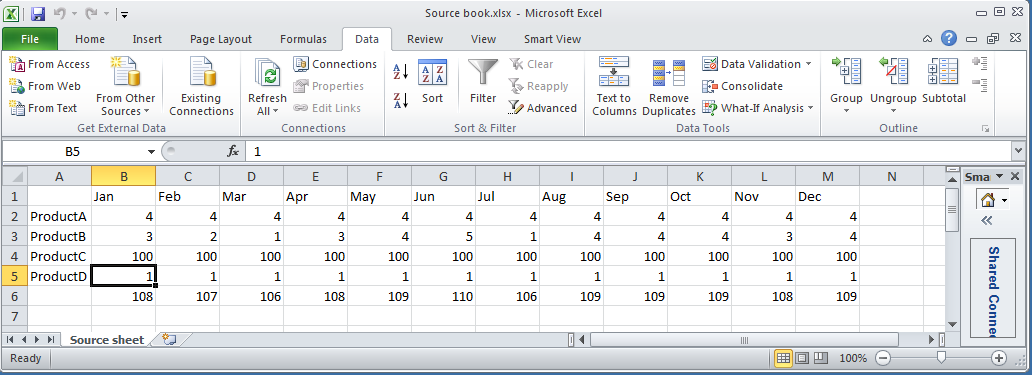
Source

Do the products in column A look familiar?  No?  They are Cameron’s detail skus to MVFEDITWW (pronounced mmmfeditwwwuuua) aka Sample.Basic.

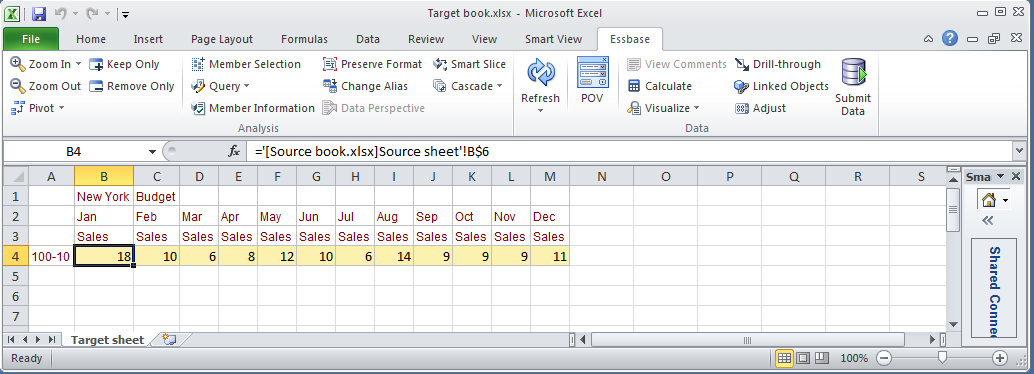
Target

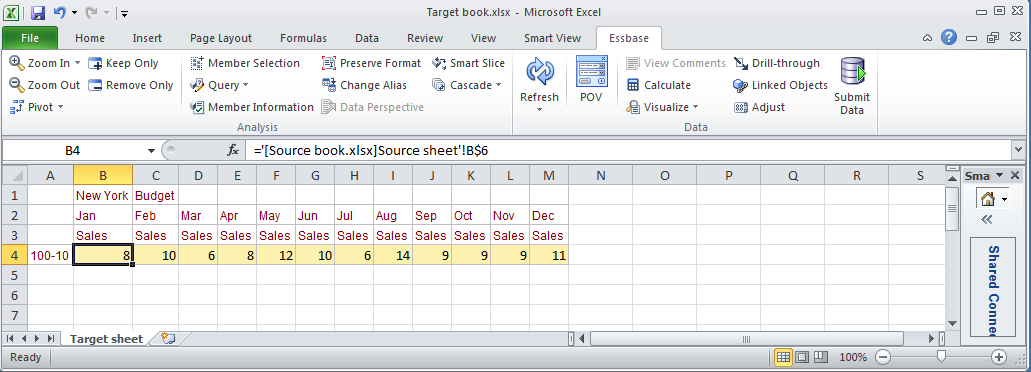
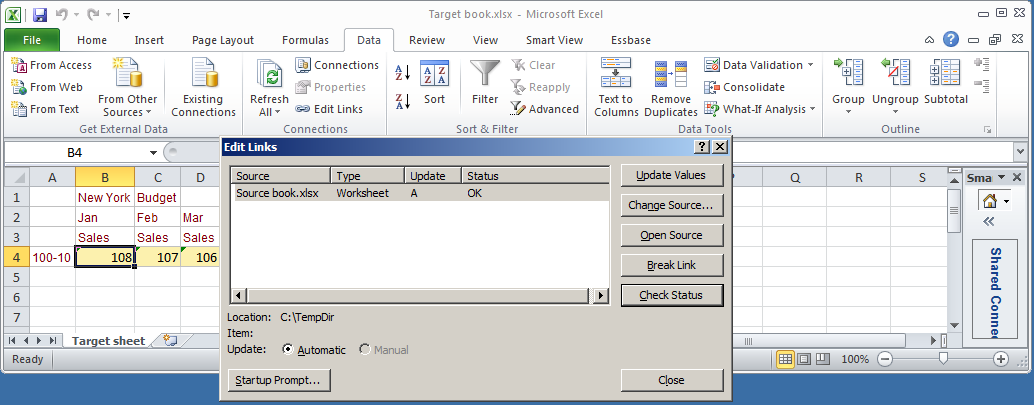
And here is that linked target in MVEDITWW’s send workbook:


Note that the total Excel formula value in the send sheet’s row 6 is linked to the target sheet’s row 4.

Updates

A change in the source:


Is reflected in the target immediately as both workbooks are in memory:

Sheet renames

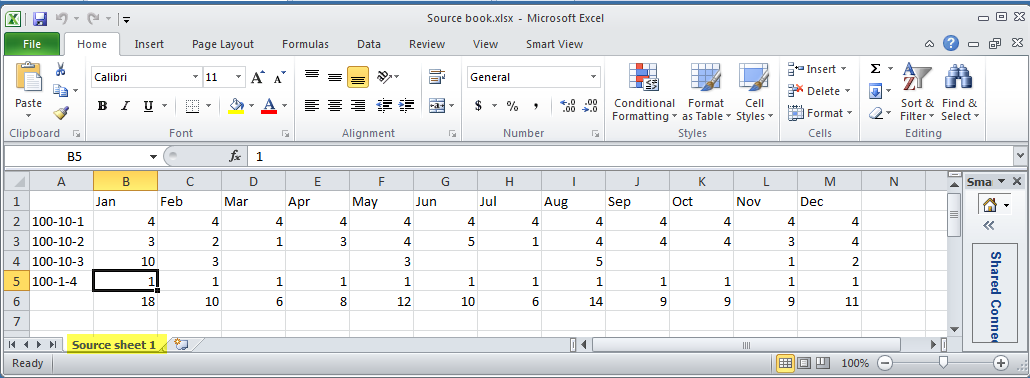
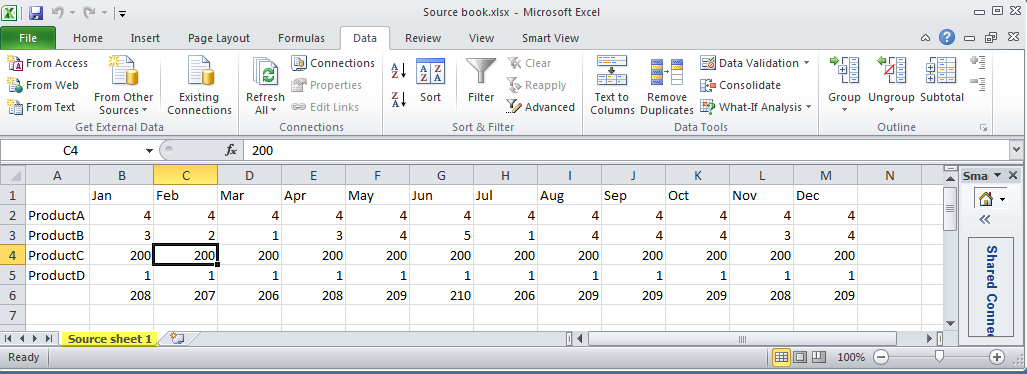
If the source sheet is renamed from “Source sheet” to “Source sheet 1”:


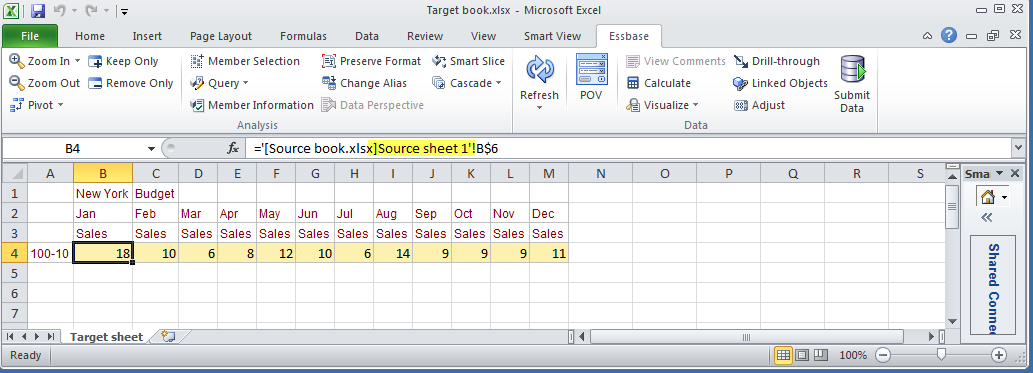
It is reflected immediately in the target workbook formula:


All very slick and goof proof.  Maybe.


Closing the files

That’s great if you have both workbooks open, but it’s often common practice, aka some form of sanity to keep just one workbook open at a single time so what’s being dealt with is obvious.  


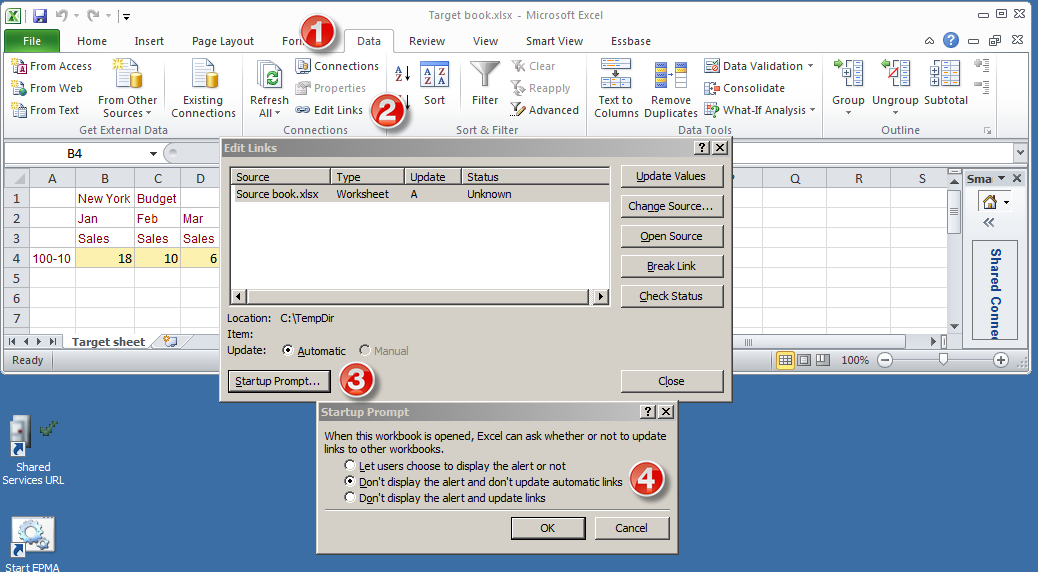
To keep an even greater degree of sanity, it is also common to disable the automatic updates of linked workbooks.  Maybe you want the target workbook to be updated, maybe you don’t.  The only way to control this is to:
  1. Go to the Data ribbon
  2. Click on Edit Links
  3. Click on Startup Prompt
  4. Click on Don’t dipslay the alert and don’t update automatic links


This then puts you in control of updating or not.  


I like this because I in general like control of my data and also because it makes this example easier to demonstrate.  NB – the functionality is the same if automatically updated so that is not a free ride to getting away from the Excel Stupid Trick.

Closed source workbook

So what happens when data gets changed in the source and then saved and closed?


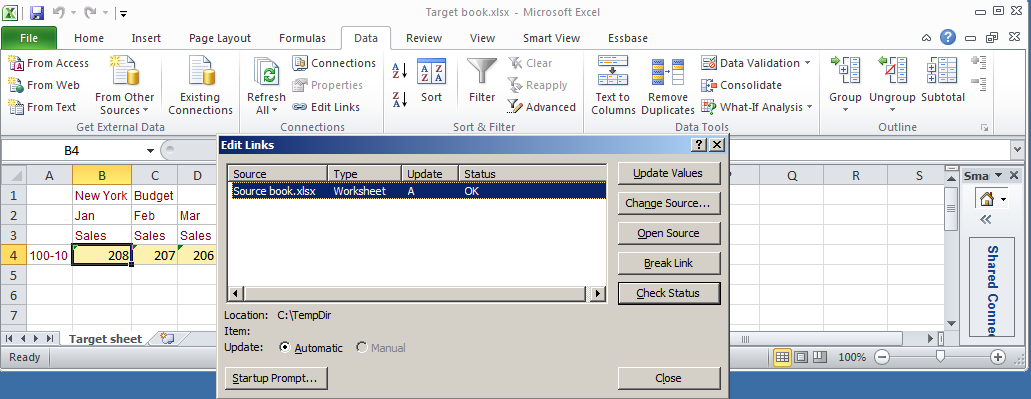
It’s not updated until it is explicitly updated by you, oh Excel god.


Updating is easy, simply go to Data->Edit Links->Update Values and the new numbers are reflected in the workbook.  Simple and again you are in control.

Renames

What happens if you rename the old sheet and then save and close?


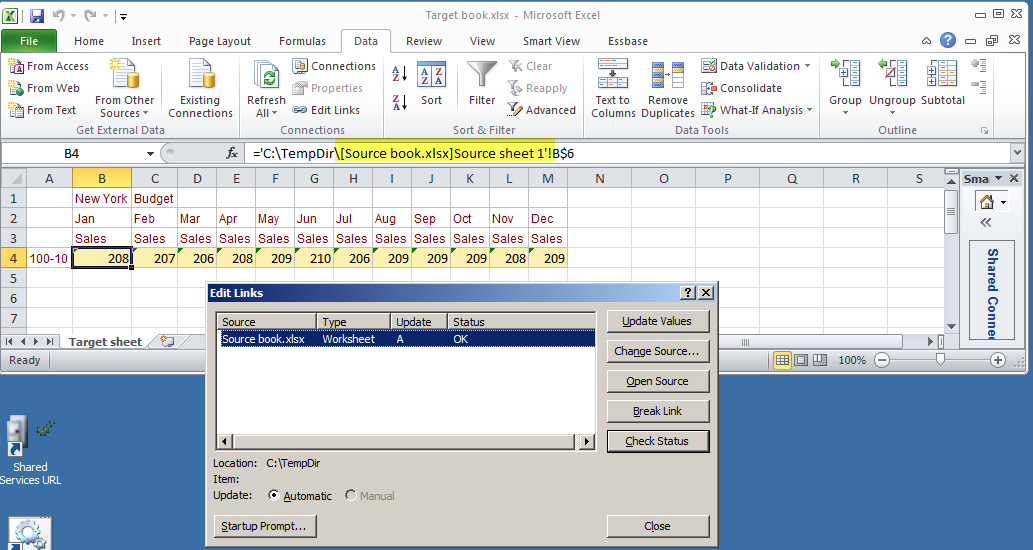
On update, Excel knows that the sheet formerly named “Source sheet” is now called “Source sheet 1”.  It is not tied to the number of worksheets in case you were thinking it went off of the index of sheets in a book.   Somewhere in the depths of Excel, there’s a code associated with the sheet name.  We see it as “Source sheet 1” or whatever; Excel has its own name that allows this kind of renaming whilst retaining the links.


Note that before the update, the sheet name is the old “Source sheet”.  After the update it is “Source sheet 1”.


This is all pretty awesome, isn’t it?  What oh what oh what could possibly go wrong?

New sheet with the same name

If I create a backup of the old sheet (hey, I may want to go back to the old data) and create a new sheet with new data, what happens?


In the example above, Excel used (I think) some sort of internal sheet code to keep the link to the renamed sheet, ignoring the displayed sheet name of “Source sheet 1”.


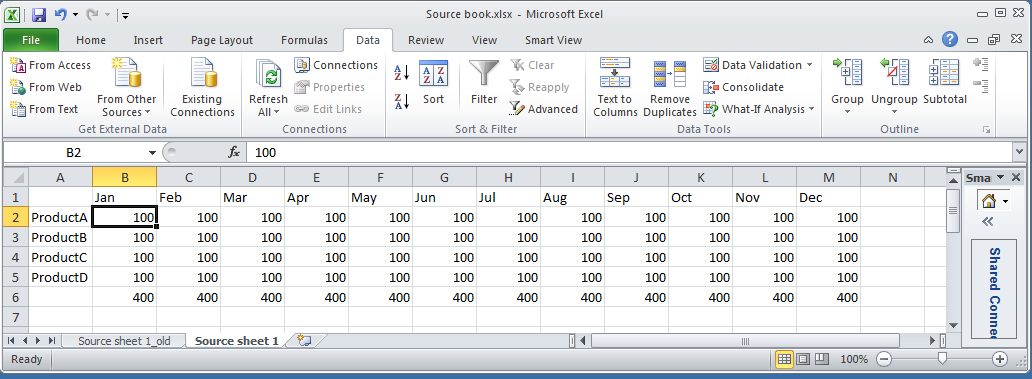
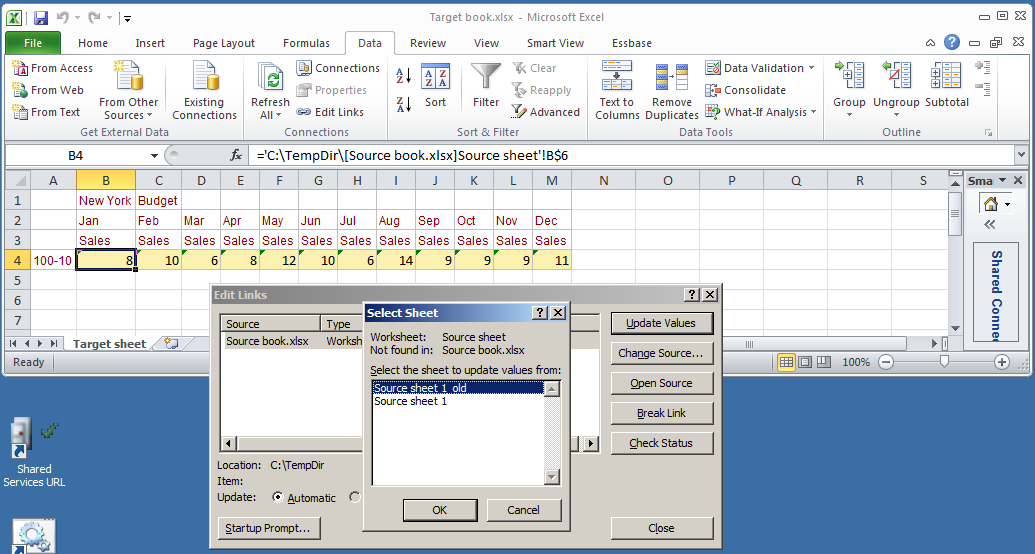
I’ve renamed the original sheet with an “_old” suffix and created a new sheet with the same layout but with a the original sheet name.


Excel is smart enough to see this and gives you a choice of sheets – original one with the “_old” suffix or the new sheet with the original “Source sheet 1” name.  Saved from certain disaster I bow down again before the genius of Microsoft.  Or should I?

A modest man with much to be modest about

We have now reached the inspiration for the title of this blog, and alas and alack, there is no false modesty here.  What do I mean by this?  I simply mean that as you can see from the above, Microsoft made linked workbooks, at least from the source sheet perspective, goof proof.  Believe me, I tried very, very, very hard to break Excel in the course of building the samples for this blog post and I just could not make it happen.  


And yet I managed to make a mess of linked workbooks even after being warned that just such an error could occur.  How did I manage to do this?  Read on so my humiliation can be complete.

Screwing up, step by step

1 – Prerequisites

Environment

I have thus far shown you a very simple set of workbooks and sheets.


Imagine a very complicated set of linked workbooks, with the source being the user set of workbooks that define base budget information and the target being a series of linked worksheets that send data to Essbase.  When I say complex, I mean there might be 20 to 70 (yes, you read that correctly) sheets in the source workbook and at least that many in the target.  Within each sheet is a link range (think of it as a mapping of source layout to target layout) and then there is another range of linked (this time only within the sheet) formula cells that are selected and sent to Essbase.  And before you start tsk-tsking, remember that this is not my process – I am just a caretaker and yes I hate it.

A birth and a death

The business created a new entity.  At the same time an old one was closed.  This is important.

2 – Getting the request

On the source side, Mabel (hello, Mabel, and yes we are almost to the “I warned you, but you didn’t listen” bit) reused and renamed an existing source sheet for the new entity.  This makes sense from her perspective as the formatting, formulas, etc. were already defined.  She simply put in a new description, new base numbers, and the existing source worksheet did its magic.  Thanks very much Microsoft.


Over on the target side, because there were so many sheets, because I do not really know the entity structure, because this is a manual process, and mainly because I am a dope, I did not follow Mabel’s lead.  This was A Bad Thing as we shall see.

3 – Adding the sheet

As the layout of all of the sheets are the same I copied an existing target send sheet – note that this was not the dead entity target sheet but another one.  Yes, that was another Bad Idea.


Being the super ultra-clever chap that I am (ahem), I knew that I would have to change the link formulas in the new target sheet and duly did so.


But I also did not delete the old send sheet for the closed entity.  This was not a super ultra-clever act and is really the key to the error.

4 – Doubling the data

So what happened?  As I showed above, Excel keeps an internal name for all of the source worksheets.  A simple sheet rename doesn’t break the links.  This is good, right?  Right?  Wrong.


Not deleting the dead sheet meant that Excel now linked twice to the renamed source sheet, once for the old dead entity and again for the new entity.  As there was supposed to be no new data in the dead entity (remember the Cameron is a dope factor) I then managed to double the data in Essbase.  Oops.


And this is, btw, precisely what Mabel warned me of.  

Ameliorating the problem in the future

Putting aside the issue of me as a user of anything but the most basic of Excel workbooks, how can something like this be avoided?

Excel is not the answer

Excel has auditing features, but it does not (at least as far as I can see) have a simple way to show what the linked worksheets are except by examining each sheet (not terribly useful when there are 70 sheets in play) or by writing a custom VBA macro to try to report the information.  Both of these are difficult-ish and time consuming.  There has to be a better way.

Power Utility Pak v7

And there is in the form of an Excel utility called Power Utility Pak (PUP).  I have to thank Dave Farnsworth (who has “swallowed the anchor” but continues to teach me) yet again for telling me about this product years ago.  If only I had it installed on my client machine…


The famous John Walkenbach wrote this utility and it is, in a word, awesome.  


Without going into all of the many features of this tool, and there are many, I will focus on the bit that gives you an audit report of linked worksheets.


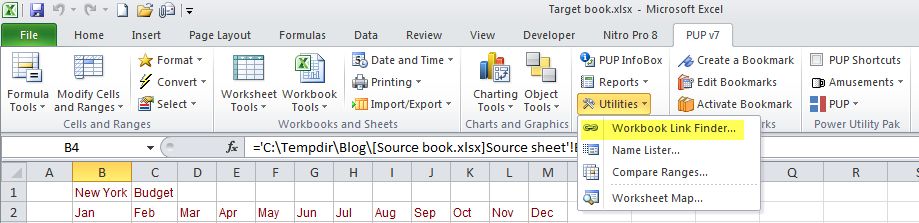
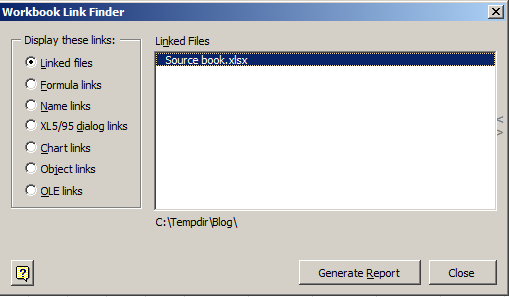
The Workbook Link Finder is exactly what I should have used.


PUP even gives you a way to display the links:


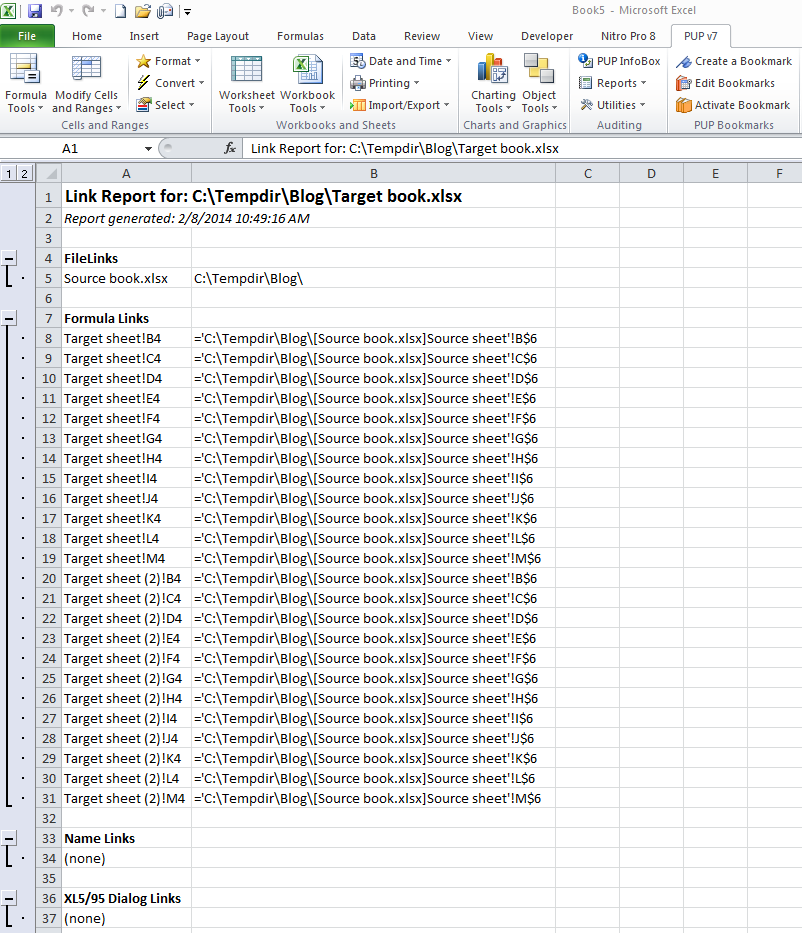
Given a target workbook with a copied target sheet (just what I did in real life), the following report comes out of PUP:


Looking at the above report, I can easily see that Target sheet and Target sheet (2) both link to the same source sheet.  In my example, this is precisely what I did not want to happen, but did.

Check it out for free

J-Walk has a free trial download available here.  I encourage you to try it out.  I am going to buy another copy and install it (if I am allowed) on my client laptop.

What have we learnt?

I think this can be summarized into a few key points:
  1. Cameron the Essbase hacker is not Cameron the Excel hacker.
  2. Yet Another Manual Process (YAMP) equals Yet Another Chance For Failure which begets Yet Another Stupid Excel Trick
  3. Tools like PuP can make life a little less painful
  4. Linked workbooks are evil
Okay, the last bit is just my opinion, but my goodness a simple Excel error led to a big Essbase data problem.


Be seeing you.
Popular Posts