Showing posts with label Kaleidoscope. Show all posts

Sunday, January 29, 2012

Where oh where have I been and why oh why would you care?

You may have noticed that I haven’t updated this blog in a long time, nor have I been feeding my obsessive need to be on OTN/Network54.  And you likely didn’t care, but I’ll tell you where I’ve been regardless.  :)

I and 12 other happy souls have been writing a book for the last six months.  No, not a book about coffee, or obscure French cars, or my imaginary service in the RAF (my callsign, if I had one, is Biggles 1 and in my imagination I fly this).  Instead, we have written something that I think is going to set the Essbase world on its collective ear – the first advanced topic Essbase book:  Developing Essbase Applications: Advanced Techniques for Finance and IT Professionals.  

No, you can’t buy it, yet, as it just went to the publisher as a first draft.  I hope it will be available by KScope12 but it will likely be available by Oracle OpenWorld.  We’ll see – this is the first book I’ve ever written and I have no real yardstick to compare times, effort, etc. against.  Yes, it has been quite the learning experience.

Again, who cares?  Why would I read this book?

You’ll read Developing Essbase Applications because:
  • That advanced topic orientation I talked about.  For the time being, you’ll simply have to trust me on this, but I am quite confident that you will find this book interesting.  Nope, I take that back, you will find this book revelatory, revolutionary, and amazing.  Hype, right?  I don’t think so – there is content in this book that exists nowhere else.  Some of it will blow your mind – really.  We’ve peer reviewed this beast and have received very positive feedback.  We’ve also gotten back the comments, “Wow, that’s really hard/amazing.  How did you guys figure that out?  I thought I knew Essbase and I didn’t know that.”  This is not a beginner’s book.  I’m not even sure it’s a midlevel developer’s book.  There’s Good Stuff inside the covers.
  • A good practices approach.  We’ve seen bad Essbase implementations.  We’ve (long, long ago) even been responsible for bad Essbase implementations.  The lessons from those bad systems were absorbed and the bad practices assiduously avoided.  Instead, we show you nothing but the right way to do Essbase.  Our internal motto during the writing of this book was, “We love Essbase and hate to see it done wrong.”
  • We do more than just tell you how to do something, we tell you why.  It’s like having a team of seasoned consultants in a book and they’re 100% dedicated to knowledge transfer.  More than a few people in on the secret have said, “Are you telling the world too much?”  If there was a finite amount of Essbase knowledge out there, then yes, maybe I’d be worried about writing ourselves out of a job.  Happily, Essbase is alive, well, and growing.  Making you grow is Developing Essbase Applications mission.

I am ever so slightly interested.  So what’s in it?

Developing Essbase Applications covers every area of advanced Essbase practice there is:
  • Essbase infrastructure
  • Data quality
  • Essbase Studio
  • BSO in depth
  • BSO to ASO conversions
  • Designing ASO for performance
  • Practical MDX
  • Essbase Java API
  • Automating with Groovy
  • Advanced Smart View
  • Implementing and administering Essbase

Who wrote the book?

An excellent question and oh how I do love writing these leading questions.  See if you recognize any names:  Dave Anderson, Joe Aultman, John Booth, Gary Crisci, Natalie Delemar, Dave Farnsworth, Cameron Lackpour, Michael Nader, Dan Pressman, Robb Salzmann, Tim Tow, and Angela Wilcox.  Jake Turrell edited.  Many more people contributed with their edits, comments, and ideas.  This was the group project to end all group projects and I am obliged to each and every one of you.

So you’re just one of 12.  What’s the big deal?

I was the editor in chief of this project.  What does that entail?  An editor in chief, at least within the context of this book:
  • Lands the publishing contract.  The Oracle ACE program helps.  No, this is not an endorsement of the book by the ACE program.  Oracle wants ACEs to write and they provide the all-important introduction to publishers.  
  • Handles all of the legal issues.  I now know more about copyright than I ever wanted to.
  • Project manages the writing.  I  will freely admit that project managing this large a group of what are essentially volunteers (yes, we are getting royalties, but split that 13 ways and figure the number of hours and it’s pretty close to volunteerism) was challenging, to say the least.
  • Helps edit each and every one of the chapters along with Natalie Delemar, Dan Pressman, Angie Wilcox, and Jake Turrell.
  • Writes a fairly awesome (ahem) chapter on data quality.
  • Lives, breathes, eats, sleeps, and anything else you can think of nothing, but nothing, but this book for the last two months.  


The writing process has been exhilarating and exhausting.  I’m happy to have done it and equally happy that it is finally over.  I need to go find billable work.

So what’s next?

I and my fellow coconspirators will keep you up to date with more information about Developing Essbase Applications as it gets closer to actual publication.  Like I wrote, we aren’t exactly doing this for money.  We wrote it to drive the art of practicing Essbase further, much further.  So think of the drip, drip, drip of news about this book as a service, not a marketing campaign.  ;)

We’re tremendously proud of what we’ve written and think you will find it tremendously valuable.

Wednesday, August 10, 2011

My take on the most awesome conference, anywhere, ever, ban none

Yeah, I liked it

The one or two regular readers of this blog who aren’t my direct relation may have wondered why I’ve not written about my quaint and curious experiences at that most excellent of all Oracle conferences, KScope11.

In fact I did write about it, quite a bit actually, on the flight back from Long Beach.  As I am not in the President’s or Admiral’s Club (Naval rank for an airline’s frequent travelers lounge is something I’ve never understood unless the plane has one of these Fly Navy signs on the side.  Were it labeled the Air Commodore’s Club it would at least be the right Service.  Such are the mysteries of marketing to a moderately-logical geek.) I was in steerage and didn’t even try to take out my laptop in the cramped confines of an airline seat.  Once home, I was just too darn tired to type in what I wrote out on foolscap, other blog posts came up, and although I intended to get around to writing it up for this blog, I just procrastinated.  Why try to dissemble?

But I was called to task by Mike Riley, Oracle ACE, President of ODTUG and all around nice guy when he asked for a paragraph from each member of the board re their impressions of KScope.  As per usual, once started I was a perpetual motion machine.  Without any further preamble, read it and weep at the ODTUG blog right here

Tuesday, May 24, 2011

What the heck is the Q?

Introduction

Well, what is it?

It’s not the name of an avant garde Broadway show.  

It isn’t used for playing snooker.  Or pretending you’re Paul Newman.  Actually, I’ve hung around with a lot of Essbase people – we’re more built like Jackie Gleason.

But I digress, yet again.  The Q in question is at the top of the Essbase forum, pinned to very tippy-top.

So what is it, anyway?

What can be seen


That seems mysterious.   And intriguing.  What do you suppose it does?  Will I ever end with the leading questions?  Yes, indeed, and I just gave you a clue.  


It’s a little different over on the Planning and Budgeting board.
What!?!  Those no-good Planning guys get the whole question!  Hmmph, bunch of second raters, if you ask me.  The cool guys got the puzzle but it had to be spelled out for Planning people.  As is typical.
NB – I have been implementing Planning since 2002.  Or was it 2001?  See, I told you Planning consultants were slow.

Essbase guys are way cooler – we (Did I mention I’ve worked with Essbase since 1993?  Or was it 1994?) just get a single letter and have to fall back on our innate intelligence, good looks, and better breeding to figure this out.  

Alternatively, you could skip all of this drivel and just click on the “Q” link.  I did.

First a tirade of praise

It’s that great big company asking you for help again.  I’m apologizing in advance of my mini-rant to all of the fine people who used to work at Hyperion and now work for Oracle.  Okay, apology over, and so the frothing at the mouth can begin.  Can anyone remember Hyperion Solutions asking us, the users and implementers of their products, for help?  Ever?  Publicly?  
Nope, thought not.

It continues to amaze me that a company Oracle’s size gets it.  But they do, and this is further proof of it.  And no, I don’t work for them nor do I own any stock.  But I do make a living off of their products and their success is my success.  I want, no, I need Oracle to succeed.  If you’re reading this blog, the same is true for you as well.

So what did I find?


Oracle’s asking us for help.  How can we not answer?

Click on the link

And you will find a five minute survey on documentation.  Fill it out, won’t you?  This is one of those moments where your self-interest and Oracle’s coincide.  Unless you like bad documentation.

How to go beyond the survey

Some of you may be familiar with this little conference I have been talking about of late:

Did you know that Oracle Support will have a lounge at KScope?

And that Oracle will be presenting at the conference?

And that this is your opportunity to engage in conversation with Oracle management?  

Yessir, it’s all true.

So what on earth are you waiting for?  

Take the survey and then show up at KScope – for the Geeks Who Matter.

See you there.

Monday, April 11, 2011

Yeah, yeah 11.1.2.1 is here, so what?

Introduction

Given the excitement around this release (geeks get enthused by some pretty odd things), you’d think an Oracle-red lightning bolt would shoot down from the heavens when I type that and smite me mightily like Thor’s hammer right on the noggin.  BONG!  Ouch, that hurt.  But I have an excuse for writing that.

I have the problem all (most) EPM implementers face – ask us to build an Essbase database, write a calc script, craft an MDX formula, proof of concept a Planning app – that we can do with aplomb and flair.  We do that for a living; we better be good at it.

But install a package that requires more than double-clicking on setup.exe and we (or at least I) go all wobbly.  I have spent countless and fruitless hours trying to get development environments to work since System 9.  Oh, eventually I mostly get them running but we are sometimes talking months (say hello System 9.0.1 and Oracle Fusion EPM 11.1.13 and 11.1.2) to get to a working state.  It is my no-longer-secret shame.  I suck at installations.  There, I have said it and I feel much better.

The problem is, I want to experience the joy that is 11.1.2.1.  Alas, my successful installation will likely occur sometime around the general release of 11.1.2.2.  What to do?

There is an answer to my (and your) problem

The answer’s name is John Booth.  He has very generously provided an Amazon Web Services (AWS) Amazon Machine Image (AMI) with the basics of 11.1.2.1 installed on it FOR FREE.

That means, with an AWS account, you (and I) can run 11.1.2.1 without installing anything.  Oh joy, oh rapture.  Maybe I can even have a life.  Maybe.  Maybe you can, too.

You can stop reading right now and go to his blog here to try out his EPM Test Drive to get all of the details.  Or keep on reading to see how someone even as technically lame as yr. obdnt. srvnt. can run 11.1.2.1 with practically no effort at all.

Sign up for Amazon Web Services

You must have an Amazon Web Services account.  Go here to start the process.  Once you have that, follow these steps to 11.1.2.1 nirvana.

Amazon has put together a nice tutorial.  I recommend that you go through it, following the Windows path as the 11.1.2.1 EPM Test Drive AMI is on Windows.  Even if you’re a Linux bigot, Go Team Windows!

Don’t be overwhelmed by all of the steps.  There is a bit of a learning curve but it isn’t that bad.

Launching 11.1.2.1 in the cloud

1)      Assuming you’ve signed up and run through the tutorial, find your IP address at http://www.whatsmyip.org/  You are going to need this to define your security access to the 11.1.2.1 image.
2)      Log onto Amazon Web Services at http://aws.amazon.com


3)      Username = youremailaddress.com, password = whateveritis.

4)      Make sure you have Adobe Flash 10.2 installed.  The below message only pops up if you don’t have Flash 10.2 installed.

5)      Click on the EC2, the Security Group, and finally the Create Security Group link.  You are going to need your IP address from step #1

6)      Name the group and give a description.  I am going to pretend my name is Alice and that she/I live in Philly, PA.  We will not talk about my identity crisis.
7)      In the bottom half of the screen, select RDP as a connection protocol:

You need only enter your will need your IP address with a /32 switch.  Then click on Add Rule.

8)      Change the IP address to:  youripaddress:32, e.g., 98.111.148.105/32 and then click on Save.  You will see the following as confirmation:

9)      Then click on Apply Rule Changes.

10)      Now click on the AMIs link.

11)   Select All Images, type in ami-b0669bd9 ami-de2bd4b7, and then click on Refresh.  The AMI should appear.

12)    Right click on the AMI and select Launch Instance

13)   Select m2.xlarge aka Extra Large and then Continue.  Don’t worry about the Availability Zone.  The power is almost yours.

14)   Take the default on the Advanced Instance Options.

15)   Take the default on Tags, or put in a value if you like.  It doesn’t really matter unless you managing multiple instances.

16)   If you haven’t already created a key pair, do so now.  Make sure that you keep that in a secure place as it is part of your authentication into AWS.  In this case I created one called “AmazonCloud”.

17)   Leave the security group at default and click on Continue.

18)   You will get a chance to review your selection.  Once you’re satisfied, click on Launch.

19)   You will receive a confirmation message.  Click on the View your instances on the Instances page link.

20)   You will see a list of running instances.  Now you play the waiting game as you are now subject to a delay equivalent to powering up a real server in your data center. 


21)   Once you’ve waited 10 to 15 minutes, right click on the AMI line, and select Connect.

22)   You will get information on how to connect to the instance.  Don’t be discouraged if you can’t; remember, it’s a virtual server oh-so-slowly booting off the drive.  You can either download the shortcut to your hard drive, or copy the public DNS to the clipboard.  Either way, you’re going to be running the Terminal Services client, aka, Remote Desktop, to connect to the server.

23)   If you click on the Download shortcut file link, save it to your Windows desktop for sanity’s sake.

NB – This is in FireFox; Internet Explorer’s dialog box looks a little different.


24)   Double click on the icon to see if it’s really running or not.

25)   You will get this scary-looking error message.  Ignore it, it’s much worse than it looks and click on Connect.

26)   Happy, happy, joy, joy.  You have now connected.
 
27)   Once started, check out how much power you have. 


28)   Go ahead, start EPM 11.1.21 by double-clicking on the Workspace shortcut .  Admit it, you’ve been waiting all day for this.  Now play, play, play or more seriously (and boringly – see, I just invented a word, my 11.1.2.1 exuberance knows no linguistic bounds) learn, learn, learn.

29)   When your brain cannot take any more, use the Start menu to Shut Down the server.  Remember, if the instance is running, you are getting charged by the hour.

30)   Your 11.1.2.1 instance is now stopped.  Any work that you have done is stored on the stopped hard drive.  If you are well and truly done with the instance of the virtual machine, right click on that Stopped AMI and select Terminate.  This will delete the AMI and its drives.  You lose all work.  If you want to keep the drive in the state you left it, leave it a Stopped state or make your own AMI from it and then Terminate the instance.  So long as the instance exists, even in a Stopped state, you are being charged, albeit a small amount.


31)    That’s it.  Have you sent John an note of appreciation yet?  :)

The best way to thank John is to come see our presentation at Kaleidoscope

You’ll have to tolerate me, as well.  Seriously, I come at this from an implementation perspective, John from an infrastructure perspective.  It’s the best of both worlds.

Think of us as Martin and Lewis.  Just call me Jerry; Dino’s the infrastructure guy.  Have a gander of us entertaining your spiritual ancestors at their convention.

Sunday, March 13, 2011

Why you should be at KScope11

If you’ve read this blog at all, you’ve heard me blather on and on about how wonderful ODTUG Kaleidoscope is and why you should go.  Yes, I am not shy about my enthusiasm for the conference.

I’m not the only one who likes KScope11.  How about hearing what other people have to say about this most excellent of Oracle conferences?  ODTUG’s President and author of the ODTUG Blog, Mike Riley, has been interviewing some Oracle community luminaries (and an exception – no points if you can guess who the 5 watt bulb might be) about:
  • The thing they like most about KScope.
  • What presentations they are looking forward to the most.
  • Have they ever been to Long Beach, California.
  • What their best ODTUG Kscope moment has been.

Who are these august few?  People just like you, that’s who.

Who do I mean?

Check out the responses to Mike’s questions.  The passion for Kscope11 runs deep and swift.  If you were on the fence re coming to KScope 2011, I’ll bet a read of one or two of the above ought to push you over onto the side of signing up right now, before the 25 March 2011 deadline for the Early Bird Registration.  

I know I’ll see you there this year.  :)

Monday, March 7, 2011

Stupid Programming Tricks #7

The Warning Before the Introduction Along With An Advertisement

Is it bad to start off a blog post with a recommendation to not read that very same blog post?  Oh well, here goes:  If you use Calc Manager in Planning this post is a complete waste of time as you have already figured all of this out. 

May I suggest spending your time doing something more constructive, like thinking about how you are going to go to the most awesome Oracle EPM conference in the whole wide world, i.e., ODTUG KScope, and see over 100 EPM and BI presentations, experience seven half day labs, attend multiple symposiums, party like a crazy EPM geek at Monday Night Madness, drink deeply of the Functional and Technical content, and oh yeah, visit http://www.kscope11.com/biepm for more information.  Hmm, that wasn’t very subtle.  I wonder who inspired me to write this?

For the rest of us, no one should spend the 30 minutes I did trying to figure this out.  The Happy Few still ought to contemplate the awesomeness that is ODTUG Kaleidoscope.

Introduction

With that preamble out of the way, for those of you who know and love EAS (is there anyone who *loves* EAS?) also know that EAS' days are numbered.  How many that may be is up to Oracle product management, but it's time to at least think about moving on down the road.

EAS and Hyperion Business Rules

With that thought (the wordplay is breathtaking) in mind, I was playing around (no life at work here but I know I'm not the only one) with Calculation Manager and was wondering -- where does security get assigned in Calc Manager for Planning?  How do I give the Planner John Q. Public access to a particular Business Rule?

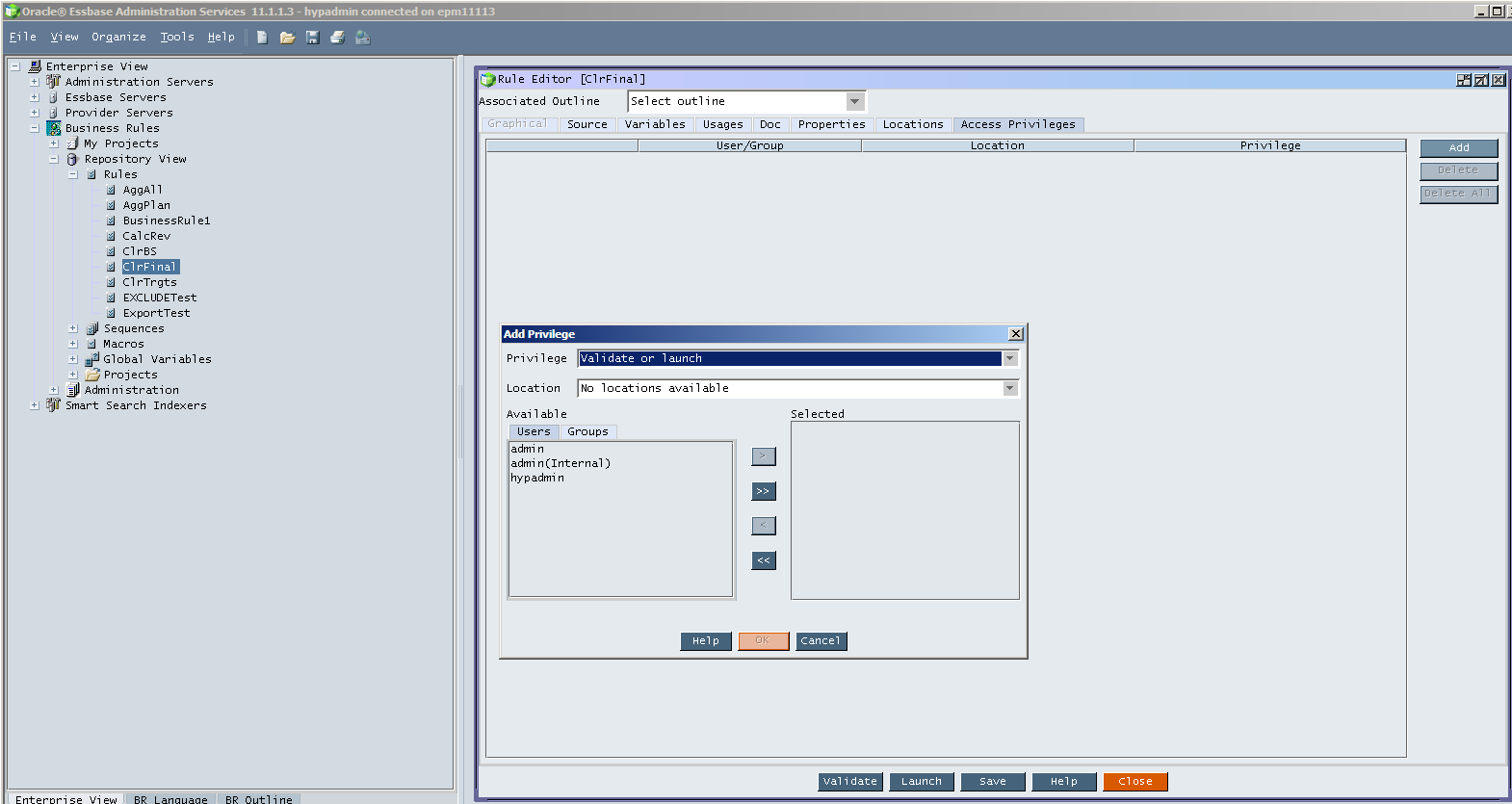
For those of you who don't use EAS/traditional HBRs, security assigns look like:

To show the above, I right clicked on the HBR "ClrFinal", opened up the rule, clicked on the tab Access Privileges, and then clicked on Add to grant one of the many, many, many users in my VM.

Calculation Manager

That's fine, but where on earth do you do it in Calc Manager?  It can't be in EAS because that's the whole (well one of the) point.  Business rules aren't in EAS, they're kind of, sort of part of Workspace.
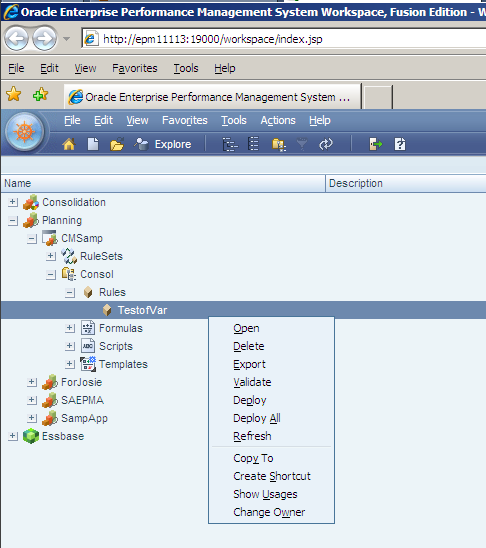
Well, when I go into Workspace, and then go to Calc Manager, security is AWOL:

Don't get fooled by that Change Owner -- that does just what it says and has nothing to do with Planner John Q. Public being able to run a rule.


So how do you do you assign access?

First, deploy the rule (you do not need to be using the Devil's Own, aka EPMA to do this as Calc Manager has its own deployment functionality) to the Planning application.

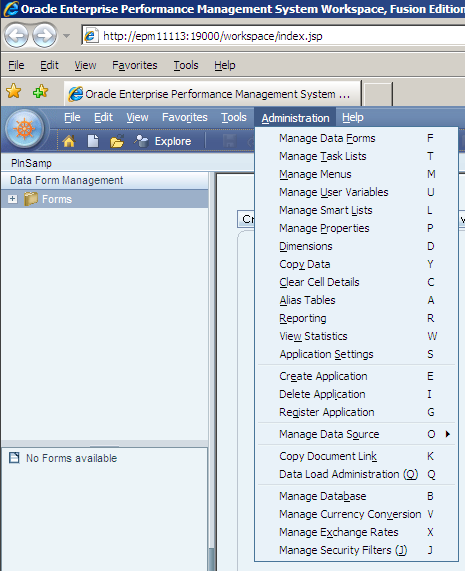
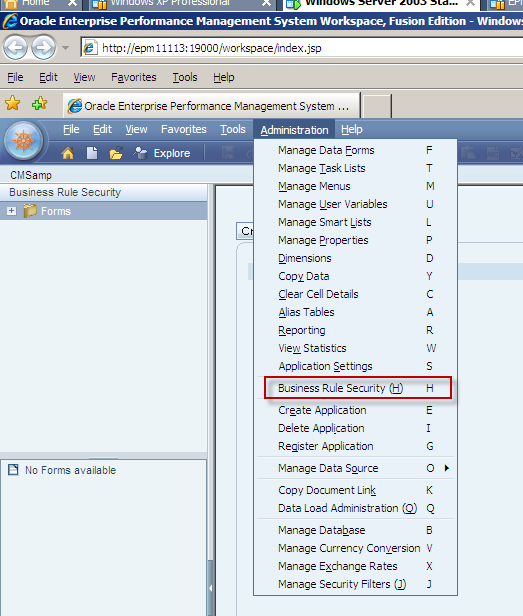
Secondly, go into Planning as an administrator and click on the Administration menu.  Do you see it?


I hope so, I highlighted it in red.  :)

Is this menu choice in Planning in non-Calc Manager Planning apps?  Nope.

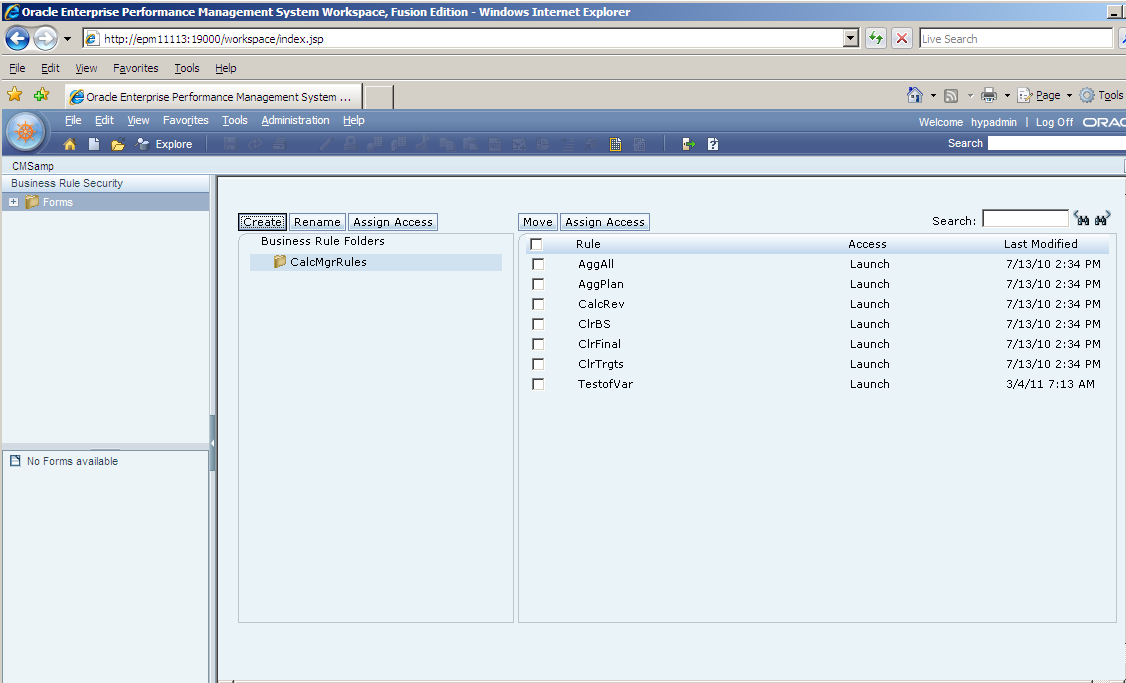
Okay, going back to Calc Manager-enabled Planning apps.  Select Business Rule Security:

This is beginning to look familiar.  Select the business rule (maddeningly, just like forms, you cannot select multiple rules) and then click on the "Assign Access" button.

You will then see the standard access assign dialog box that you know and love for member security, forms, etc.


If you click on "Add Access" you will note that there are only two actions a Planner can make -- Launch or No Launch.  You don't see anything here because in Calc Manager, admins can't have access to a Calc Manager rule, just like they can't have access to a form -- they are above security.  This is at least consistent with the way Planning works for other objects and a big improvement over HBR’s crazy you-can-write-the-rule-but-not-launch-or-validate-it-till-you-give-yourself-rights-to-it model.

To my point about the oddness that was once known as Hyperion Allocations Manager, aka, HAM, this is different than EAS' HBR security, which can assign validation/launch and modify access.

So where is the provisioning for modifying the rule?  It's driven by Shared Services roles.

Phew, a lot of writing for a very simple thing.  But I've saved you 1/2 hour of your life, so you owe me.

Addendum

P.S.  Extra credit, and again, if you use Calc Manager you already know this one -- did anyone catch the weird thing about the screenshot for assigning security access in Planning versus the HBRs available in Calc Manager?  This is a fairly well known bug as documented here:  http://forums.oracle.com/forums/thread.jspa?messageID=6685183&#6685183  No, I have not patched my VM to fix this.

Friday, February 18, 2011

Not Groundhog Day, but ODTUG Month

Not Groundhog day, but ODTUG month

The hits keep coming from ODTUG.  And why not?  We are talking about the very best Oracle EPM conference, ever.  Yep, even better than last year’s and that was pretty darn good.

What do I mean?  

Take a look at the hands on training.  

There’s going to be some amazing content:
DayTimePresenterContent
Monday11 am to 1 pmAdam Bloom, OracleUsing Actions to Integrate Oracle BI EE with External Systems

1:15 pm to 3:30 pm123OlapEPM Architect against Planning

4:00 pm to 6:00 pmRon Moore, MTGEssbase Studio:  The Basics and Beyond
Tuesday8:30 am to 10:45 am123OlapHFM Consolidation Rules

1:45 pm to 5:30 pmJohn Booth, Emerging SolutionsInstalling the 11.1.2 Release Efficiently
Wednesday8:30 am to 10:45 amRatan Vakil, interRel ConsultingOBIEE on Essbase:  The Future of Ad-hoc Analysis

1:45 pm to 5:15 pmRittman MeadOracle BI 11g Answers and Dashboards Hands-on Labs
Thursday10:30 am to 12:45 pm123OlapAn Intro to ODI in the Hyperion Environment
That is a tremendous amount of training.  Think about it – how much would that cost you if you went to each one of those classes separately at a training partner or Oracle?  Big, big, big bucks is how much.  A lot more money than the member (you are a member of ODTUG, aren’t you) Early Bird price of $1,400.

Running, not crawling

Did you read the bit about your lab server (and oh by the way, you are going to get your very own for the duration of the lab)?  No more woefully underpowered laptops.  You are going to be in the Cloud.  I hope you’re all a fan of Amazon, because it’s going to be Full360’s EPM Amazon Machine Image (and yes, OBIEE and ODI 11g will be in that cloud image as well) running on a nice big, fat, juicy 15 gigabyte server (Amazon is a little weird with the memory sizes) with four CPUs.  Feel the power.

Bring your laptop and even your Macintosh

You’re going to connect using Microsoft Terminal Services, aka Remote Desktop Connection, a standard part of Windows.  Just make sure you have it by going to Start->Run and typing in mstsc.exe.  If you see this you are good to go:

Macs need a download

Having owned a Macintosh since the 128k Thin Mac of 1984, I am thrilled to announce that Macs can also play in the Windows cloud.  Just make sure that you download and install Remote Desktop Connection Client 1.0.3 for Mac.

So what are you waiting for?

The registration page is right here.  Labs fill up quickly, as I have found to my sorrow when I dawdle.  Don’t be like me – sign up now and get that great value that is ODTUG Kscope 11.

Popular Posts